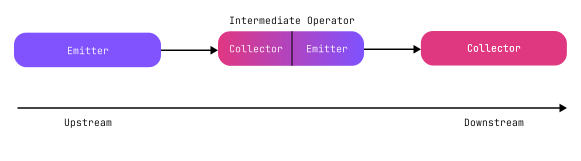
A flow represents a sequential stream of values that can be produced asynchronously. Unlike a suspending function, which returns one value, you can use flows to work with multiple sequential values over time.
You can use flows to create flow pipelines that load data progressively, react to event streams, and model subscription-style APIs.
A flow pipeline is a sequence of operations that involves the following roles:
Emitter: produces values.
Intermediate operators (optional): consume values from a flow, apply an operation to them, and return another flow.
Collector: consumes values from a flow.
Here's a simple example that shows how these pipeline roles work together:
import kotlinx.coroutines.flow.*
//sampleStart
suspend fun main() {
// The emitter produces values
flowOf(0x4B, 0x6F, 0x74, 0x6C, 0x69, 0x6E)
// The intermediate operator consumes values,
// applies an operation, and returns another flow
.map { value -> value.toChar() }
// The collector consumes the transformed values
.collect { updatedValue ->
println("Say '$updatedValue'!")
}
}
//sampleEnd
In a flow, values move from an emitter toward a collector, from upstream to downstream. Intermediate operators collect an upstream flow, apply an operation to its values, and return a new downstream flow. That downstream flow can become the upstream flow for the next collector.
Kotlin provides the following flow types:
Cold flows start producing values when collected. Each collector triggers a new, independent execution of the flow.
Hot flows emit values independently of collectors and share the same stream of values with all collectors.
The code block of a cold flow builder doesn't run until a collector collects it. Each new collector starts a new execution of the flow.
Create a cold flow
To create a cold flow, use the flow() builder function. Inside its block, use the emit() function to emit values to collectors:
import kotlinx.coroutines.*
import kotlinx.coroutines.flow.*
//sampleStart
fun main() {
// Creates a flow
val pageFlow = flow {
for (page in 1..3) {
println("Loading page $page...")
// Emits each page as it is loaded
emit("Page $page")
}
}
println("Creating a cold flow doesn't run it!")
}
//sampleEnd
In this example, the flow() builder function returns a Flow<T>, but it doesn't start executing its block. A cold flow is like a recipe: it defines how to produce values, but it only starts producing values when you collect it.
You can also create cold flows with the following functions:
.asFlow(): converts an existing iterable, such as a range, into a flow.
Here's an example:
import kotlinx.coroutines.*
import kotlinx.coroutines.flow.*
fun main() {
// Creates a flow from provided values
val predefinedPageFlow = flowOf("Page 1", "Page 2", "Page 3")
// Creates a flow from a range
val generatedPageFlow = (1..3).asFlow()
}
Collect a cold flow
To collect a cold flow, use the collect() function, which triggers the emissions from the upstream flow. If you pass a lambda to collect(), it receives each emitted value:
import kotlinx.coroutines.*
import kotlinx.coroutines.flow.*
import kotlin.time.Duration.Companion.milliseconds
//sampleStart
suspend fun main() {
withContext(Dispatchers.Default) {
val pageFlow = flow {
for (page in 1..3) {
println("Loading page $page...")
emit("Page $page")
}
}
// Collects the flow with a lambda that receives each emitted page
pageFlow.collect { page ->
println("Processing $page...")
delay(100.milliseconds)
println("Done processing $page.")
}
}
}
//sampleEnd
Each call to collect() runs the entire cold flow from the beginning. If multiple collectors collect the same cold flow, each collector triggers its own collection:
import kotlinx.coroutines.*
import kotlinx.coroutines.flow.*
import kotlin.time.Duration.Companion.milliseconds
//sampleStart
suspend fun main() {
val pageFlow = flow {
// Reads the name of the current coroutine
val coroutineName = currentCoroutineContext()[CoroutineName]?.name
println("Starting emissions in $coroutineName")
for (page in 1..3) {
println("Loading page $page in $coroutineName")
emit("Page $page")
}
println("Done emitting in $coroutineName")
}
withContext(Dispatchers.Default) {
// Launches a collector that processes each page slowly
launch(CoroutineName("a slow coroutine")) {
pageFlow.collect {
println("Processing $it slowly")
delay(100.milliseconds)
println("Done processing $it slowly")
}
}
// Launches a collector that processes each page quickly
launch(CoroutineName("a fast coroutine")) {
pageFlow.collect {
println("Processing $it quickly")
delay(10.milliseconds)
println("Done processing $it quickly")
}
}
}
}
//sampleEnd
In this example, CoroutineName adds a name to each coroutine. You can use CoroutineName for debugging. Here, it helps show which collector runs each collection.
Intermediate flow operators
Intermediate operators apply operations to an upstream flow and return a new downstream flow. They are cold, so the returned flow doesn't start processing values until it's collected, even when the upstream flow is hot.
Here's an example of a simplified custom .map() operator that applies a transformation to each emitted value:
import kotlinx.coroutines.*
import kotlinx.coroutines.flow.*
//sampleStart
// A simplified custom implementation of the default .map() operator
fun <T, R> Flow<T>.myMap(transform: suspend (value: T) -> R): Flow<R> = flow {
// Collects values from the upstream flow
this@myMap.collect { value ->
// Transforms each collected value and emits the result
emit(transform(value))
}
}
suspend fun main() {
// Creates a flow, applies the custom map operator, and collects the transformed values
flowOf(1, 2, 3).myMap { 2 * it }.collect {
println("Collecting $it")
}
}
//sampleEnd
Call suspending functions inside a flow builder
Unlike in sequences, you can call suspending functions inside a flow() builder function:
import kotlinx.coroutines.*
import kotlinx.coroutines.flow.*
//sampleStart
suspend fun loadPage(): Int {
delay(100)
return 3
}
suspend fun main() {
flow {
emit(loadPage())
}.collect {
println(it)
// 3
}
}
//sampleEnd
However, a flow() builder function must emit values from the same coroutine context where it runs. You can't start another coroutine that calls emit() in its block, and you can't change the coroutine context with withContext():
import kotlinx.coroutines.*
import kotlinx.coroutines.flow.*
//sampleStart
suspend fun main() {
// This fails with an exception!
flow {
// Changes the coroutine context with withContext()
withContext(Dispatchers.IO) {
emit('a')
}
}.collect {
println("This never prints")
}
}
//sampleEnd
This restriction applies to the flow() builder function.
Alternatively, you can use channelFlow() to emit values from multiple coroutines.
Change the coroutine context of a cold flow with .flowOn()
By default, a cold flow runs in the same coroutine context as the collector.
If you want the flow to run in a different coroutine context, use the .flowOn() operator. This operator is context-preserving. It changes only the coroutine context of the upstream flow while keeping the downstream flow in the caller's context.
Here's an example of a cold flow that emits values in one coroutine context and collects them in another:
import kotlinx.coroutines.*
import kotlinx.coroutines.flow.*
//sampleStart
suspend fun main() {
withContext(Dispatchers.Default + CoroutineName("downstream")) {
flow {
val coroutineName = currentCoroutineContext()[CoroutineName]?.name
// Emits in the coroutine context applied with .flowOn()
println("Emitting '1' in $coroutineName")
// Emitting '1' in upstream
emit(1)
// Changes the coroutine context of the upstream flow
}.flowOn(Dispatchers.IO + CoroutineName("upstream"))
.collect {
val coroutineName = currentCoroutineContext()[CoroutineName]?.name
// Collects in the caller's coroutine context
println("Collecting '$it' in $coroutineName")
// Collecting '1' in downstream
}
}
}
//sampleEnd
Handle exceptions in flows
Both emitters and collectors can throw exceptions.
If you don't handle an exception during flow collection, it propagates upstream from the collector and is thrown to the caller of the collect() function.
You can handle such exceptions by wrapping the collect() function in a try-catch block, for example:
import kotlinx.coroutines.*
import kotlinx.coroutines.flow.*
class MyFlowException(message: String) : Exception(message)
//sampleStart
suspend fun main() {
val myFlow = flow {
try {
// The emit() function calls the lambda passed to collect()
emit('a')
} catch (e: MyFlowException) {
println("Collector threw $e")
// Rethrows the downstream exception
throw e
}
}
// Wraps flow collection in try-catch
try {
myFlow.collect {
// Throws an exception from the collect() lambda
throw MyFlowException("Can't process '$it'!")
}
} catch (e: MyFlowException) {
println("Flow collection failed with $e")
// Rethrows the exception to the caller
throw e
}
}
//sampleEnd
In this example, the collector throws an exception when it receives a value from the emit() function. The flow() builder function catches this downstream exception.
When you catch an exception thrown by the collector inside a flow builder function, rethrow it. This preserves exception transparency and lets the caller of collect() handle the exception.
Use the .catch() operator to handle upstream exceptions
To handle exceptions before they reach the collector, use the .catch() operator.
You can use the .catch() operator to handle exceptions from the upstream flow, for example by using the emit() function to emit a fallback value downstream:
import kotlinx.coroutines.*
import kotlinx.coroutines.flow.*
//sampleStart
suspend fun main() {
flow {
emit("a")
emit("b")
// Throws an exception from the upstream flow
throw UnsupportedOperationException(
"I am tired of listing letters"
)
}.catch { upstreamException ->
println("Upstream completed with $upstreamException!")
// Emits a fallback value downstream
emit("Upstream terminated with an exception!")
}.collect {
println("Got '$it'")
}
}
//sampleEnd
In this example, the upstream flow emits values before throwing an exception. The .catch() operator handles the exception and emits "Upstream terminated with an exception!" as a fallback value.
When a flow is expected to throw some exceptions during normal operation, handle the recoverable exceptions in .catch() and rethrow any unexpected exceptions.
Here's an example where a flow loads data and reports its progress:
import kotlinx.coroutines.*
import kotlinx.coroutines.flow.*
import kotlin.random.*
import java.io.IOException
import kotlin.time.Duration.Companion.milliseconds
//sampleStart
sealed interface LoadingState {
sealed interface Terminal: LoadingState
object Started: LoadingState
data class Percentage(val percents: Int): LoadingState
object Failed: Terminal
object Done: Terminal
}
fun loadBlob(url: String) = flow {
emit(LoadingState.Started)
val failureChancePerStep = 1 - java.lang.Math.pow(0.99, 10.0)
repeat(10) { step ->
if (Random.nextDouble() < failureChancePerStep)
throw IOException("Failed to load!")
emit(LoadingState.Percentage((step + 1) * 10))
delay(10.milliseconds)
}
emit(LoadingState.Done)
}.catch { e ->
println("Loading data failed with $e")
if (e is IOException) {
// Handles an expected exception
emit(LoadingState.Failed)
} else {
// Rethrows unexpected exceptions, so the collect() fails with them
throw e
}
}
suspend fun main() {
loadBlob("https://example.com/").collect {
println("Got '$it'")
}
}
//sampleEnd
In this example, if loading fails with an expected exception, the .catch() operator uses the emit() function to emit a fallback state. For unexpected exceptions, rethrow them in the .catch() operator. This lets the caller of the collect() function receive exceptions that the flow doesn't handle.
The .catch() operator doesn't handle exceptions thrown by the collector. If the lambda passed to collect() throws an exception, handle it with a try-catch block around the collect() function:
import kotlinx.coroutines.*
import kotlinx.coroutines.flow.*
suspend fun main() {
val myFlow = flow {
for (char in listOf('a', 'o', '5', 'c')) {
try {
emit(char)
} catch (e: IllegalArgumentException) {
println("Collector doesn't support character '$char': $e")
// Rethrows the downstream exception
throw e
}
}
}.catch { e ->
// Doesn't run because the exception happens downstream
println("Upstream threw an exception: $e")
}
try {
myFlow.collect {
require(!it.isDigit()) { "Digits are not allowed!" }
}
} catch (e: IllegalArgumentException) {
// Handles the exception from the collect() lambda
println("Flow collection failed with $e")
}
}
Since the collect() lambda runs after .catch(), you can't use .catch() to handle exceptions thrown from it. To handle exceptions from code that runs for each emitted value with .catch(), place that code in .onEach() before .catch().
The .onEach() operator runs its lambda before each value is emitted downstream. If .catch() handles an exception from .onEach(), the flow completes and doesn't emit the next value:
Here's an example:
import kotlinx.coroutines.*
import kotlinx.coroutines.flow.*
import kotlin.random.*
import java.io.IOException
import kotlin.time.Duration.Companion.milliseconds
suspend fun main() {
flowOf('a', 'o', '5', 'c')
// Runs before each value is emitted downstream
.onEach {
require(!it.isDigit()) { "Digits are not allowed!" }
println("Got '$it'")
}
.catch { e ->
println("Caught an exception: $e")
}
.collect()
}
In this example, the .onEach() operator runs upstream from .catch(), so the .catch() operator handles the exception when the require() check fails for '5'.
Restart the upstream flow after an exception
Some operations may temporarily fail, such as a network request that loses its connection. For these cases, you can use the .retry() operator to restart the upstream flow after an exception.
The .retry() operator receives an exception and restarts collection when its lambda returns true, up to the specified number of retries. For example, .retry(3) retries the upstream flow up to three times after the first failed attempt.
If the lambda returns false, .retry() stops retrying and rethrows the exception.
Here's an example that retries loading up to three times after an IOException:
import kotlinx.coroutines.*
import kotlinx.coroutines.flow.*
import kotlin.random.*
import java.io.IOException
import kotlin.time.Duration.Companion.milliseconds
import kotlin.time.Duration.Companion.seconds
//sampleStart
sealed interface LoadingState {
sealed interface Terminal: LoadingState
object Started: LoadingState
data class Percentage(val percents: Int): LoadingState
object Failed: Terminal
object Done: Terminal
}
fun loadBlob(url: String) = flow {
emit(LoadingState.Started)
val failureChancePerStep = 1 - java.lang.Math.pow(0.99, 10.0)
repeat(10) { step ->
if (Random.nextDouble() < failureChancePerStep)
throw IOException("Failed to load!")
emit(LoadingState.Percentage((step + 1) * 10))
delay(10.milliseconds)
}
emit(LoadingState.Done)
}.retry(3) { e ->
if (e is IOException) {
// This is an expected error
// Waits for one second before retrying
delay(1.seconds)
true
} else {
// Stops retrying and rethrows unexpected exceptions
false
}
}
suspend fun main() {
loadBlob("https://example.org/").collect {
println("Got $it")
}
}
//sampleEnd
Flow cancellation
Flow cancellation stops collection when the result is no longer needed, such as when a request times out.
Flow collection is tied to the coroutine that calls the collect() function. When that coroutine is canceled, the collection stops, and the upstream flow is canceled too.
To cancel flow collection, call the cancel() function on the Job of the collecting coroutine:
import kotlinx.coroutines.*
import kotlinx.coroutines.flow.*
import kotlin.random.*
import java.io.IOException
import kotlin.time.Duration.Companion.milliseconds
//sampleStart
val myFlow = flow {
var i = 0
try {
while (true) {
println("Emitting $i")
emit(i)
println("Emitted $i")
++i
delay(10.milliseconds)
}
} catch (e: Throwable) {
println("Upstream finished with $e")
throw e
}
}
suspend fun main() {
coroutineScope {
val job = launch {
try {
myFlow.collect {
println("Processing $it")
delay(5.milliseconds)
}
} catch (e: Throwable) {
println("Collection finished with $e")
throw e
}
}
delay(100.milliseconds)
// Cancels the coroutine that collects the flow
job.cancel()
}
}
//sampleEnd
The collector can also cancel the upstream flow while the collecting coroutine stays active. To do this, throw a CancellationException from the collector.
The .take() operator uses this behavior to stop collecting after a fixed number of values. For example, .take(3) collects only the first three values from the upstream flow, then cancels it.
Here's an example that uses a simplified version of the .take() operator:
import kotlinx.coroutines.*
import kotlinx.coroutines.flow.*
import kotlin.random.*
import java.io.IOException
import kotlin.time.Duration.Companion.milliseconds
//sampleStart
// Defines a simplified version of the default .take() operator
fun <T> Flow<T>.myTake(count: Int): Flow<T> = flow {
require(count > 0)
val cancellationException = CancellationException()
var elementsRemaining = count
try {
this@myTake.collect {
emit(it)
--elementsRemaining
if (elementsRemaining == 0) {
// Cancels the upstream flow after the requested number of values
throw cancellationException
}
}
} catch (e: Throwable) {
if (e === cancellationException) {
// Handles the CancellationException used to cancel the upstream flow
// Completes the flow after the set number of values in .myTake()
} else {
// Rethrows unexpected exceptions
throw e
}
}
}
suspend fun main() {
(0..1000).asFlow().myTake(3).collect {
println("Got $it")
}
}
//sampleEnd
In this example, the .myTake() function emits values from the upstream flow until all requested values are emitted. Then it throws a CancellationException to cancel the upstream flow.
Emit values concurrently with channelFlow()
The flow() builder function is simple and efficient for flows that emit values from one coroutine. If you want to emit values from multiple coroutines concurrently into the same flow, use the channelFlow() builder function. You can use it for concurrent work that reports results progressively, such as loading data from multiple sources.
The channelFlow() builder function creates a cold flow that uses a channel to send values from multiple coroutines. Inside the builder, use the send() function instead of the emit() function to produce values.
Here's an example that uses channelFlow() to collect two flows concurrently and re-emit their values with a simplified version of the .merge() operator:
import kotlinx.coroutines.*
import kotlinx.coroutines.flow.*
import kotlin.random.*
import java.io.IOException
import kotlin.time.Duration.Companion.milliseconds
//sampleStart
// Defines a simplified version of the default .merge() operator
fun <T> Flow<T>.myMerge(other: Flow<T>): Flow<T> = channelFlow {
// CoroutineScope and SendChannel are available as receivers here
// Launches a coroutine that collects the receiver flow
launch {
// Collects the receiver flow
this@myMerge.collect {
send(it)
}
}
launch {
// Launches a coroutine that collects the other flow
other.collect {
// Calls SendChannel.send
send(it)
}
}
}
suspend fun main() {
val flow1 = (0..3).asFlow().onEach { delay(20.milliseconds) }
val flow2 = (6..9).asFlow().onEach { delay(50.milliseconds) }
flow1.myMerge(flow2).collect { println(it) }
}
//sampleEnd
The channelFlow() builder function uses a buffered channel, allowing producers to send values ahead of the collector until the buffer is full. By default, the buffer can hold up to 64 values. When the buffer is full, producers suspend until the buffer has free space.
You can change the buffer capacity with the .buffer() operator. For example, .buffer(12) lets producers send up to 12 values ahead of the collector, while .buffer(0) removes the buffer, so each value is sent only when the collector can receive it.
Here's an example:
import kotlinx.coroutines.*
import kotlinx.coroutines.flow.*
import kotlin.random.*
import java.io.IOException
import kotlin.time.Duration.Companion.milliseconds
//sampleStart
suspend fun main() {
val oneHundredNumbers = channelFlow {
repeat(100) {
println("Sending $it")
send(it)
}
}
// Uses the default buffer capacity
oneHundredNumbers.collect {
println("Processing $it")
delay(10.milliseconds)
}
// Removes the buffer so sending and processing interleave from the start
oneHundredNumbers.buffer(0).collect {
println("Processing $it")
delay(10.milliseconds)
}
}
//sampleEnd
In this example, oneHundredNumbers flow uses the default buffer capacity, while oneHundredNumbers.buffer(0) flow has no buffer.
With the default buffer capacity, the producer sends values quickly until the buffer becomes full. After that, send() suspends until the buffer has free space, so Sending and Processing messages start to interleave.
With .buffer(0), each send() call waits until the collector can receive the value, so Sending and Processing interleave from the start.
Hot flows
Hot flows are shared streams that emit values independently of collectors. They keep emitting values even when no collector is active, and multiple collectors can collect the same emissions from an already active stream instead of starting a new execution.
A collector of a hot flow is called a subscriber.
You can use hot flows when multiple parts of an application need to react to the same stream of updates, such as incoming chat messages, user actions, or UI state changes.
Kotlin provides two hot flow types:
SharedFlow broadcasts values to multiple subscribers. Use it when you need to broadcast events that happen over time, such as messages or notifications.
StateFlow is a specialized SharedFlow that always holds the latest state value. Use it when you need to represent state that changes over time, such as UI state.
Create a SharedFlow
SharedFlow is a hot flow that broadcasts emitted values that happen over time to its subscribers.
A MutableSharedFlow exposes functions for emitting values. If you expose it directly, code outside the class can emit values into the flow.
To prevent this, store the mutable flow in a private backing property and expose a read-only SharedFlow with the .asSharedFlow() function. To emit values to subscribers, use the emit() function on the MutableSharedFlow:
data class Message(
val senderId: Int,
val time: Instant,
val text: String,
)
class Chatroom {
// Stores the SharedFlow in a private backing property
private val _messages = MutableSharedFlow<Message>()
// Exposes a read-only SharedFlow to subscribers
val messages: SharedFlow<Message>
get() = _messages.asSharedFlow()
suspend fun sendMessageToEveryone(message: Message) {
// Emits the message to subscribers
_messages.emit(message)
}
}
Just like with cold flows, you can use the collect() function to collect values from a SharedFlow.
You can also configure a SharedFlow to immediately replay already emitted values to new subscribers. The replay cache works like a small history buffer, storing a fixed number of previous emissions.
To set how many previous emissions a new subscriber receives, use the replay parameter in MutableSharedFlow():
// Sets the number of already emitted messages new subscribers receive on subscription
const val MESSAGES_TO_REMEMBER = 10
class Chatroom {
private val _messages = MutableSharedFlow<Message>(
// Replays the set amount of last emitted messages to new subscribers
replay = MESSAGES_TO_REMEMBER
)
val messages: SharedFlow<Message>
get() = _messages.asSharedFlow()
suspend fun sendMessageToEveryone(message: Message) {
// Emits the message to subscribers of the messages flow
_messages.emit(message)
}
}
Let's look at an example that uses a SharedFlow to model a chat room, which sends each new message to active subscribers and replays recent messages to subscribers that join later:
import kotlinx.coroutines.*
import kotlinx.coroutines.flow.*
import kotlin.random.*
import java.io.IOException
import kotlin.time.Duration.Companion.milliseconds
import kotlin.time.*
data class Message(
val senderId: Int,
val time: Instant,
val text: String,
)
// Sets the number of already emitted messages that new subscribers receive on subscription
const val MESSAGES_TO_REMEMBER = 10
class Chatroom {
// Stores the SharedFlow in a private backing property
private val _messages = MutableSharedFlow<Message>(
// Replays the set amount of last emitted messages to new subscribers
replay = MESSAGES_TO_REMEMBER
)
// Exposes a read-only SharedFlow to subscribers
val messages: SharedFlow<Message>
get() = _messages.asSharedFlow()
// Emits the message to subscribers
suspend fun sendMessageToEveryone(message: Message) {
_messages.emit(message)
}
}
suspend fun main() {
val nUsers = 3
val chatroom = Chatroom()
withContext(Dispatchers.Default) {
// Starts a message reader for each user
val messageReaders = List(nUsers) { userId ->
// Starts collection before messages are emitted
launch(start = CoroutineStart.UNDISPATCHED) {
chatroom.messages.collect { message ->
println("User $userId received $message")
}
}
}
// Sends a greeting from each user
repeat(nUsers) { userId ->
chatroom.sendMessageToEveryone(
Message(
userId,
Clock.System.now(),
"Hello from $userId!"
)
)
}
// Delays to make sure people have enough time to chat
delay(100.milliseconds)
// Cancels readers because SharedFlow collection doesn't finish by itself
messageReaders.forEach { it.cancel() }
}
}
This ensures that each coroutine reaches collect(), subscribes to messages, and suspends before sendMessageToEveryone() emits messages. Without it, a collecting coroutine might start later and miss earlier emissions if the replay cache is too small.
Use explicit backing fields to expose hot flows
You can use explicit backing fields to expose a read-only SharedFlow while keeping a mutable backing field inside the class.
Explicit backing fields define the implementation type in the field declaration. Inside the class, the compiler smart casts the property to the backing field type, so you can call the emit() function without a separate private backing property.
Here's an example:
import kotlinx.coroutines.*
import kotlinx.coroutines.flow.*
import kotlin.time.Clock
import kotlin.time.Duration.Companion.milliseconds
import kotlin.time.ExperimentalTime
import kotlin.time.Instant
data class Message(
val senderId: Int,
val time: Instant,
val text: String,
)
const val MESSAGES_TO_REMEMBER = 10
//sampleStart
class Chatroom {
// Exposes a read-only SharedFlow with a mutable backing field
val messages: SharedFlow<Message>
field = MutableSharedFlow<Message>(
replay = MESSAGES_TO_REMEMBER
)
suspend fun sendMessageToEveryone(message: Message) {
// Emits through the mutable backing field inside Chatroom
messages.emit(message)
}
}
//sampleEnd
suspend fun main() {
val nUsers = 3
val chatroom = Chatroom()
withContext(Dispatchers.Default) {
val messageReaders = List(nUsers) { userId ->
launch(start = CoroutineStart.UNDISPATCHED) {
chatroom.messages.collect { message ->
println("User $userId received $message")
}
}
}
repeat(nUsers) { userId ->
chatroom.sendMessageToEveryone(
Message(
senderId = userId,
time = Clock.System.now(),
text = "Hello from $userId!"
)
)
}
delay(100.milliseconds)
messageReaders.forEach { it.cancel() }
}
}
Create a StateFlow
StateFlow is a hot flow that stores a single state value and emits updates when that value is replaced with a new one. New subscribers receive the current value as soon as they start collecting, and then receive new values each time the state updates.
You can use StateFlow to represent state that changes over time, such as loading progress, UI state, or the state of an object.
To create a StateFlow, use the MutableStateFlow() function with an initial value:
// Creates a MutableStateFlow with LoadingState.Started as the initial value
val result = MutableStateFlow<LoadingState>(LoadingState.Started)
fun loadBlob(url: String): StateFlow<LoadingState> {
val result = MutableStateFlow<LoadingState>(LoadingState.Started)
DownloadManager.startLoading(
url,
onPercentageLoaded = { percentage ->
// Replaces the current state with the latest progress
result.value = LoadingState.Percentage(percentage)
},
onCompletion = {
// Replaces the current state with the completion state
result.value = LoadingState.Done
},
onFailure = {
// Replaces the current state with the failure state
result.value = LoadingState.Failed
}
)
}
Similar to MutableSharedFlow, MutableStateFlow exposes APIs for emitting updates. If you expose it directly, any code that receives it can update the state by downcasting it to MutableStateFlow.
To prevent this, expose the mutable flow as a read-only StateFlow with the .asStateFlow() function:
fun loadBlob(url: String): StateFlow<LoadingState> {
val result = MutableStateFlow<LoadingState>(LoadingState.Started)
DownloadManager.startLoading(
url,
onPercentageLoaded = { percentage ->
result.value = LoadingState.Percentage(percentage)
},
onCompletion = {
result.value = LoadingState.Done
},
onFailure = {
result.value = LoadingState.Failed
}
)
// Exposes the loading state as a read-only StateFlow
return result.asStateFlow()
}
Here's an example that uses StateFlow to report loading progress from a callback-based API:
import kotlinx.coroutines.*
import kotlinx.coroutines.flow.*
import kotlin.time.*
import kotlin.time.Duration.Companion.milliseconds
import kotlin.time.Duration.Companion.seconds
import kotlin.io.encoding.*
import java.io.IOException
import kotlin.random.Random
//sampleStart
sealed interface LoadingState {
sealed interface Terminal: LoadingState
object Started: LoadingState
data class Percentage(val percents: Int): LoadingState
object Failed: Terminal
object Done: Terminal
}
fun loadBlob(url: String): StateFlow<LoadingState> {
// Creates a mutable StateFlow with the initial loading state
val result = MutableStateFlow<LoadingState>(LoadingState.Started)
DownloadManager.startLoading(
url,
onPercentageLoaded = { percentage ->
// Replaces the current state with the latest progress
result.value = LoadingState.Percentage(percentage)
},
onCompletion = {
// Replaces the current state with the completion state
result.value = LoadingState.Done
},
onFailure = {
// Replaces the current state with the failure state
result.value = LoadingState.Failed
}
)
// Exposes the loading state as a read-only StateFlow
return result.asStateFlow()
}
// Defines a callback-based API that downloads data asynchronously
object DownloadManager {
// Starts loading the url asynchronously
fun startLoading(
url: String,
onPercentageLoaded: (Int) -> Unit,
onCompletion: () -> Unit,
onFailure: (Throwable) -> Unit
) {
// Uses GlobalScope for illustrative purposes only,
// to keep this example self-contained
GlobalScope.launch {
val failureChancePerStep = 1 - java.lang.Math.pow(0.99, 10.0)
repeat(10) { step ->
if (Random.nextDouble() < failureChancePerStep) {
onFailure(IOException("Failed to load!"))
return@launch
}
onPercentageLoaded((step + 1) * 10)
delay(10.milliseconds)
}
onCompletion()
}
}
}
suspend fun main() {
loadBlob("https://example.com/").onEach { state ->
when (state) {
is LoadingState.Started -> {
// Waits for progress updates
}
is LoadingState.Percentage ->
println("Loaded ${state.percents}...")
is LoadingState.Failed ->
println("Loading failed.")
is LoadingState.Done ->
println("Finished loading!")
}
}.takeWhile { it !is LoadingState.Terminal }.collect()
}
//sampleEnd
Since StateFlow is a hot flow, collection doesn’t complete on its own. In this example, the .takeWhile() operator stops collection when loading reaches a terminal state.
A StateFlow emits an update only when the new value differs from the current value.
You can also update a StateFlow by calculating the new state from the current state. Use the .update() function for these updates. The .update() function updates the value atomically, which helps when multiple coroutines update the same MutableStateFlow.
Here's an example where likes are stored in a StateFlow, and each new state is calculated from the previous state:
import kotlinx.coroutines.*
import kotlinx.coroutines.flow.*
import kotlin.time.*
import kotlin.time.Duration.Companion.milliseconds
import kotlin.time.Duration.Companion.seconds
import kotlin.io.encoding.*
import java.io.IOException
import kotlin.random.Random
//sampleStart
class Post(val id: Long) {
// Stores the current number of likes as a StateFlow
private val _numberOfLikes = MutableStateFlow<Int>(
// Sets the initial number of likes
0
)
// Exposes a read-only StateFlow with the current number of likes
val numberOfLikes: StateFlow<Int>
get() = _numberOfLikes.asStateFlow()
// Adds a like
fun like() {
// Increments the number of likes atomically for concurrent and multithreaded calls
_numberOfLikes.update { it + 1 }
}
}
suspend fun drawUpdatedNumberOfLikes(likes: Int) {
// Displays the latest number of likes
println("${Clock.System.now()}: the number of likes is $likes")
}
suspend fun main() {
withContext(Dispatchers.Default) {
val post = Post(15)
val notifyingJob = launch {
post.numberOfLikes.collect {
drawUpdatedNumberOfLikes(it)
}
}
// Simulates users who like the post
coroutineScope {
repeat(10) {
launch {
delay(Random.nextInt(100).milliseconds)
post.like()
}
}
}
// Cancels collection after all simulated users finish
notifyingJob.cancelAndJoin()
}
}
//sampleEnd
In this example, the .update() function increments the number of likes atomically. This prevents lost updates when multiple coroutines call the like() function at the same time.
Store accumulated state in a StateFlow
Sometimes you might want subscribers to receive the result of all previous emissions, not only the latest emitted value.
For example, a chat room can keep its message history as a single state value. When a new user joins the chat room, they receive the current message history first. Then they continue receiving updates when new messages arrive.
You can model this behavior with a StateFlow.
To do so, store the full message history as the current value with StateFlow<List<Message>>, instead of broadcasting each chat message as a separate event with SharedFlow<Message>:
import kotlinx.coroutines.*
import kotlinx.coroutines.flow.*
import kotlin.time.*
import kotlin.time.Duration.Companion.milliseconds
import kotlin.time.Duration.Companion.seconds
import kotlin.io.encoding.*
import java.io.IOException
import kotlin.random.Random
//sampleStart
data class Message(
val senderId: Int,
val time: Instant,
val text: String,
)
class Chatroom {
// Stores the full message history
private val _messageHistory = MutableStateFlow<List<Message>>(emptyList())
// Exposes a read-only StateFlow with the current message history
val messageHistory: StateFlow<List<Message>>
get() = _messageHistory.asStateFlow()
// Sends a message to all subscribers of the messageHistory flow
suspend fun sendMessageToEveryone(message: Message) {
// Adds the new message to the current history atomically
_messageHistory.update {
it + message
}
}
}
suspend fun main() {
val nUsers = 3
val chatroom = Chatroom()
withContext(Dispatchers.Default) {
// Starts a message reader for each user
val messageReaders = List(nUsers) { userId ->
launch(start = CoroutineStart.UNDISPATCHED) {
chatroom.messageHistory.collect { currentHistory ->
println("User $userId sees the history as $currentHistory")
}
}
}
// Sends a greeting from each user
repeat(nUsers) { userId ->
chatroom.sendMessageToEveryone(
Message(
userId,
Clock.System.now(),
"Hello from $userId!"
)
)
}
// Delays to make sure users have enough time to receive updates
delay(100.milliseconds)
// Cancels readers because StateFlow collection doesn't finish by itself
messageReaders.forEach { it.cancel() }
}
}
//sampleEnd
In this example, messageHistory stores the full list of previous messages as the current state. When a new message is sent, the .update() function creates a new list from the previous history and adds the new message atomically.
Since messageHistory is a StateFlow, subscribers receive the current message history when they start collecting. After that, they receive a new list each time a message is sent, which changes the chat history.
Convert cold flows to hot flows
A cold flow runs its upstream operations separately for each collector. When multiple subscribers need emissions from the same upstream collection, you can convert the cold flow to a hot flow that shares that collection with its subscribers.
The following simplified version of .shareIn() demonstrates this idea by collecting a cold flow once, emitting its values into a MutableSharedFlow, and exposing it as a read-only SharedFlow:
import kotlinx.coroutines.flow.*
import kotlinx.coroutines.*
fun <T> Flow<T>.simpleShareIn(scope: CoroutineScope): SharedFlow<T> {
val sharedFlow = MutableSharedFlow<T>()
scope.launch {
this@simpleShareIn.collect {
sharedFlow.emit(it)
}
}
return sharedFlow.asSharedFlow()
}
suspend fun main() {
}
In this example, simpleShareIn() starts a new coroutine in the provided scope. To stop collecting from the upstream flow, cancel the scope that runs the collecting coroutine.
If the upstream flow throws an exception, this collecting coroutine fails. Use operators such as .catch() or .retry() before sharing the flow to handle upstream exceptions before the collecting coroutine fails.
The built-in .shareIn() function provides this pattern without requiring you to create a MutableSharedFlow yourself. It also adds options for controlling when upstream collection starts and stops, and how many previous emissions new subscribers receive.
To use the built-in .shareIn() function, provide the following arguments:
The coroutine scope where the upstream flow is collected.
The SharingStarted strategy that controls when upstream collection starts and stops. For example, SharingStarted.Eagerly starts upstream collection immediately in the provided scope, before any subscriber starts collecting.
The optional replay value that controls how many previous emissions new subscribers receive.
The .shareIn() function collects the upstream flow in the provided coroutine scope and broadcasts its emissions to subscribers.
Here's an example where .shareIn() converts a cold flow to a hot flow that shares serialized chat messages with multiple subscribers:
import kotlinx.coroutines.*
import kotlinx.coroutines.flow.*
import kotlin.time.*
import kotlin.time.Duration.Companion.milliseconds
import kotlin.time.Duration.Companion.seconds
import kotlin.io.encoding.*
import java.io.IOException
import kotlin.random.Random
//sampleStart
data class Message(
val senderId: Int,
val time: Instant,
val text: String,
)
class Chatroom {
// Stores the message flow
private val _messages = MutableSharedFlow<Message>()
// Exposes a read-only SharedFlow with emitted messages
// New subscribers don't receive already emitted messages
val messages: SharedFlow<Message>
get() = _messages.asSharedFlow()
// Sends a message to all subscribers of the messages flow
suspend fun sendMessageToEveryone(message: Message) {
_messages.emit(message)
}
}
suspend fun main() {
val nUsers = 3
val chatroom = Chatroom()
withContext(Dispatchers.Default) {
// Creates a child scope of the currently running coroutine
val derivedFlowsScope = CoroutineScope(
currentCoroutineContext() + Job(currentCoroutineContext()[Job])
)
// Shares serialized messages between subscribers
val serializedMessages: SharedFlow<String> =
chatroom
.messages
.map {
// Serializes each message once for the shared flow
"senderId: ${it.senderId}, time: ${it.time}, text: " +
Base64.Default.encode(it.text.encodeToByteArray())
}
.shareIn(
// Starts the sharing coroutine in this scope.
// The upstream flow, including .map(), runs in that coroutine
derivedFlowsScope,
// Starts collecting the upstream flow immediately,
// before the first subscriber appears
SharingStarted.Eagerly,
// Doesn't replay previous serialized messages to new subscribers
replay = 0,
)
// Starts a message reader for each user
val messageReaders = List(nUsers) { userId ->
launch(start = CoroutineStart.UNDISPATCHED) {
serializedMessages.collect { serializedMessage ->
println("User $userId observes the message $serializedMessage")
}
}
}
// Sends a greeting from each user
repeat(nUsers) { userId ->
chatroom.sendMessageToEveryone(
Message(
userId,
Clock.System.now(),
"Hello from $userId!"
)
)
}
// Delays to make sure users have enough time to receive updates
delay(100.milliseconds)
// Cancels readers because SharedFlow collection doesn't finish by itself
messageReaders.forEach { it.cancel() }
// Cancels the scope that runs the derived hot flow
derivedFlowsScope.cancel()
}
}
//sampleEnd
In this example, the .map() operator creates a cold flow that serializes each message. Without the .shareIn() function, each collector runs that serialization separately. The .shareIn() function shares one upstream collection, so each message is serialized once and then shared with all subscribers.
Because SharingStarted.Eagerly starts upstream collection immediately, the derived hot flow starts collecting chatroom.messages as soon as .shareIn() is called.
Similarly, to convert a cold flow to a StateFlow, use the .stateIn() function.
Unlike .shareIn(), .stateIn() requires an initial value because a StateFlow must always have a current value.
For example:
val lastUpdateFlow: StateFlow<Instant?> =
chatroom
.messageHistory
.map { currentHistory -> currentHistory.lastOrNull()?.time }
.stateIn(
// Starts the sharing coroutine in this scope
// The upstream flow, including .map(), runs in that coroutine
derivedFlowsScope,
// Starts collecting when the first subscriber appears
// and stops when the last subscriber disappears
SharingStarted.WhileSubscribed(),
// Sets the initial state before the first upstream emission
null,
)
Cancel hot flows
Hot flows don't stop when a subscriber is canceled.
When you cancel the coroutine that collects a hot flow, you only cancel that subscriber. The hot flow can still emit values to other subscribers, and the coroutine that produces those values can keep running.
Hot flows themselves don't have a cancellation operation. To cancel a hot flow, cancel the coroutine or scope that produces values for it.
Hot flows created with the .shareIn() or .stateIn() extension functions continue to collect the upstream flow until the sharing coroutine is canceled. To stop collection from the upstream flow, cancel the scope that runs the sharing coroutine.
Here's an example where canceling the scope passed to .stateIn() stops a derived hot flow from collecting new values:
import kotlinx.coroutines.*
import kotlinx.coroutines.flow.*
import kotlin.time.*
import kotlin.time.Duration.Companion.milliseconds
import kotlin.time.Duration.Companion.seconds
import kotlin.io.encoding.*
import java.io.IOException
import kotlin.random.Random
data class Message(
val senderId: Int,
val time: Instant,
val text: String,
)
class Chatroom {
// Stores the message history
private val _messageHistory = MutableStateFlow<List<Message>>(emptyList())
// Exposes a read-only StateFlow with the current message history
val messageHistory: StateFlow<List<Message>>
get() = _messageHistory.asStateFlow()
// Sends a message to all subscribers of the messageHistory flow
suspend fun sendMessageToEveryone(message: Message) {
_messageHistory.update {
it + message
}
}
}
//sampleStart
suspend fun main() {
val chatroom = Chatroom()
withContext(Dispatchers.Default) {
// Creates a child scope of the currently running coroutine
val derivedFlowsScope = CoroutineScope(
currentCoroutineContext() + Job(currentCoroutineContext()[Job])
)
val totalMessages = chatroom.messageHistory
.map { currentHistory ->
currentHistory.size
}.onEach {
println("There are currently $it messages")
}.stateIn(
// Starts the sharing coroutine in this scope
derivedFlowsScope
)
// Updates messageHistory
chatroom.sendMessageToEveryone(
Message(0, Clock.System.now(), "We are shutting down soon!")
)
delay(100.milliseconds)
// Cancels the scope that runs the derived hot flow
derivedFlowsScope.cancel()
// Updates messageHistory, but totalMessages no longer receives the update
chatroom.sendMessageToEveryone(
Message(0, Clock.System.now(), "We have shut down.")
)
println("Last collected history size: ${totalMessages.value}")
println("Actual history size: ${chatroom.messageHistory.value.size}")
}
}
//sampleEnd
In this example, when you call the derivedFlowsScope.cancel() function, totalMessages stops collecting updates from messageHistory.
The sendMessageToEveryone() function still updates messageHistory because the coroutine that calls it wasn't canceled. As a result, totalMessages.value keeps the last collected size, while chatroom.messageHistory.value.size shows the actual number of messages.
Handle exceptions in hot flows
In cold flows, upstream exceptions propagate to the caller of collect() unless you use an operator such as .catch() to handle them first.
Hot flows don't propagate exceptions from producers to subscribers. If code that emits to a MutableSharedFlow or updates a MutableStateFlow throws an exception, handle it in the coroutine that runs that code. If a subscriber throws an exception while collecting, handle it in the collecting coroutine.
Hot flows created with the .shareIn() or .stateIn() extension functions collect from the upstream flow in a sharing coroutine. If the upstream flow throws an exception, the exception cancels the sharing coroutine:
You can restart upstream collection after a failure. To do so, place the .retry() operator before .shareIn() or .stateIn():
import kotlinx.coroutines.*
import kotlinx.coroutines.flow.*
import kotlin.time.Duration.Companion.milliseconds
//sampleStart
suspend fun main() {
coroutineScope {
launch {
var currentAttempt = 0
val stateFlow = flow {
delay(10.milliseconds)
if (currentAttempt++ < 5) {
println("An error happened!")
error("An upstream failure")
} else {
println("Success.")
emit(10)
}
}
// Restarts the upstream flow after recoverable failures
.retry(retries = 5)
.stateIn(
// Starts the sharing coroutine in this scope
this@launch
)
stateFlow.collect {
println("Observed $it")
// Cancels collection and the sharing coroutine
this@launch.cancel()
}
}
}
}
//sampleEnd
In this example, the flow fails five times before it emits a value. Because .retry() runs before .stateIn(), it handles each upstream failure before the failure reaches the sharing coroutine.
After the upstream flow emits 10, the collecting coroutine receives the value and cancels itself. Since the same coroutine is also the parent of the sharing coroutine, this stops the derived hot flow.