Cancellation lets you request to stop a coroutine before it completes. It stops work that's no longer needed, such as when a user closes a window or navigates away in a user interface while a coroutine is still running.
You can use cancellation to release resources early and to stop a coroutine from accessing objects past their disposal. You can also use it to stop long-running coroutines that perform repeated work, such as:
Sending heartbeats.
Running scheduled tasks.
Updating a state to reflect the newest reading, such as in a clock UI.
Cancellation works through the Job handle, which represents the lifecycle of a coroutine and its parent-child relationships. Job allows you to check whether the coroutine is active and allows you to cancel it, along with its children, as defined by structured concurrency.
Cancel coroutines
A coroutine is canceled when the cancel() function is invoked on its Job handle. Coroutine builder functions such as .launch() return a Job. The .async() function returns a Deferred, which implements Job and supports the same cancellation behavior.
You can call the cancel() function manually, or it can be invoked automatically through cancellation propagation when a parent coroutine is canceled.
When a coroutine is canceled, it throws a CancellationException the next time it checks for cancellation. Suspending functions in the kotlinx.coroutines library, such as the delay() function, check for cancellation when they suspend.
You can use the awaitCancellation() function to suspend a coroutine until it's canceled. It's equivalent to calling delay(Duration.INFINITE).
Here's an example of how to manually cancel a coroutine:
import kotlinx.coroutines.*
suspend fun main() {
//sampleStart
withContext(Dispatchers.Default) {
// Used as a signal that the coroutine has started running
val childStarted = CompletableDeferred<Unit>()
val childJob: Job = launch {
println("The coroutine has started")
// Completes the CompletableDeferred,
// signaling that the coroutine has started running
childStarted.complete(Unit)
try {
// Suspends indefinitely
// This call will never return unless the coroutine is canceled
awaitCancellation()
} catch (e: CancellationException) {
println("The coroutine was canceled: $e")
// Always rethrow cancellation exceptions!
throw e
}
println("This line will never be executed")
}
// Waits for the coroutine to start before canceling it
childStarted.await()
// Cancels the coroutine,
// so awaitCancellation() throws a CancellationException
childJob.cancel()
}
// Coroutine builders such as withContext() or coroutineScope()
// wait for all child coroutines to complete,
// even when the children are canceled
println("All coroutines have completed")
//sampleEnd
}
In this example, CompletableDeferred is used as a signal that the coroutine has started running. The coroutine calls complete() when it starts executing, and await() only returns once that CompletableDeferred is completed. You don't need this check to cancel a coroutine. It's included here to make the example reproducible by ensuring that the coroutine starts and prints its messages before it's canceled.
Because Deferred implements Job, cancellation works the same way for coroutines created by the async() coroutine builder function:
val deferred = async { /* ... */ }
deferred.cancel()
Cancellation propagation
Structured concurrency ensures that canceling a coroutine also cancels all of its children. This prevents child coroutines from continuing their work after their parent coroutine is canceled.
Here's an example:
import kotlinx.coroutines.*
suspend fun main() {
withContext(Dispatchers.Default) {
//sampleStart
// Used as a signal that the child coroutines have been launched
val childrenLaunched = CompletableDeferred<Unit>()
// Launches two child coroutines
val parentJob = launch {
launch {
println("Child coroutine 1 has started running")
try {
awaitCancellation()
} finally {
println("Child coroutine 1 has been canceled")
}
}
launch {
println("Child coroutine 2 has started running")
try {
awaitCancellation()
} finally {
println("Child coroutine 2 has been canceled")
}
}
// Completes the CompletableDeferred,
// signaling that the child coroutines have been launched
childrenLaunched.complete(Unit)
}
// Waits for the parent coroutine to signal that it has launched
// all of its children
childrenLaunched.await()
// Cancels the parent coroutine, which cancels all its children
parentJob.cancel()
//sampleEnd
}
}
In this example, each child coroutine uses a finally block, so the code inside it runs when the coroutine is canceled. Here, CompletableDeferred signals that the child coroutines are launched before they're canceled, but it doesn't guarantee that they start running. If they're canceled first, nothing is printed.
In this section, you can learn how adding suspension points, such as calls to the yield() function, lets coroutines react to cancellation.
Suspension points and cancellation
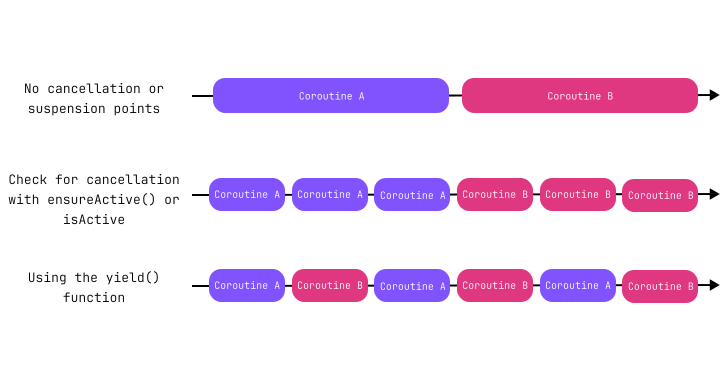
When a coroutine is canceled, it continues running until it reaches a point in the code where it may suspend, also known as a suspension point. If the coroutine suspends there, the suspending function checks whether it has been canceled. If it has, the coroutine stops and throws CancellationException.
A call to a suspend function is a suspension point, but it doesn't always suspend. For example, when awaiting a Deferred result, the coroutine only suspends if that Deferred isn't completed yet.
Here's an example using common suspending functions that suspend, enabling the coroutine to check and stop when it's canceled:
import kotlinx.coroutines.*
import kotlinx.coroutines.sync.Mutex
import kotlinx.coroutines.channels.Channel
import kotlin.time.Duration.Companion.milliseconds
import kotlin.time.Duration
suspend fun main() {
//sampleStart
withContext(Dispatchers.Default) {
val childJobs = listOf(
launch {
// Suspends until canceled
awaitCancellation()
},
launch {
// Suspends until canceled
delay(Duration.INFINITE)
},
launch {
val channel = Channel<Int>()
// Suspends while waiting for a value that's never sent
channel.receive()
},
launch {
val deferred = CompletableDeferred<Int>()
// Suspends while waiting for a value that's never completed
deferred.await()
},
launch {
val mutex = Mutex(locked = true)
// Suspends while waiting for a mutex that remains locked indefinitely
mutex.lock()
}
)
// Gives the child coroutines time to start and suspend
delay(100.milliseconds)
// Cancels all child coroutines
childJobs.forEach { it.cancel() }
}
println("All child jobs completed!")
//sampleEnd
}
The yield() suspending function
If a coroutine doesn't suspend, other coroutines can't run on the same thread until it completes. As a result, coroutines that don't suspend run sequentially on that thread. If a coroutine doesn't suspend for a long time, it also doesn't stop when it's canceled.
In CPU-intensive computations and other code that runs for a long time without suspending, call the yield() function periodically. This function releases the current thread and gives other coroutines a chance to run on it. It also ensures that the coroutine checks for cancellation regularly. If the coroutine is canceled, the yield() function throws a CancellationException.
Here's an example:
import kotlinx.coroutines.*
fun main() {
//sampleStart
// runBlocking uses the current thread for running all coroutines
runBlocking {
val coroutineCount = 5
repeat(coroutineCount) { coroutineIndex ->
launch {
val id = coroutineIndex + 1
repeat(5) { iterationIndex ->
val iteration = iterationIndex + 1
// Suspends temporarily to give other coroutines a chance to run
// Without this, the coroutines run sequentially
yield()
// Prints the coroutine index and iteration index
println("$id * $iteration = ${id * iteration}")
}
}
}
}
//sampleEnd
}
In this example, each coroutine uses yield() to let other coroutines run between iterations.
Check for cancellation explicitly
You can check for cancellation explicitly, which lets long-running code react to cancellation without suspending. A long-running coroutine that doesn't suspend can prevent other coroutines on the same thread from running until it completes. Unless this behavior is intentional for your use case, use the yield() function instead.
Depending on the API, the check either returns a Boolean value or throws an exception:
The isActive property returns false when the coroutine is canceled.
The ensureActive() function throws a CancellationException when the coroutine is canceled.
Interrupt blocking code when coroutines are canceled
On the JVM, some blocking functions, such as Thread.sleep() or BlockingQueue.take(), can block the current thread. These blocking functions can be interrupted, which stops them prematurely. However, when you call them from a coroutine, cancellation doesn't interrupt the thread.
To interrupt the thread when canceling a coroutine, wrap the blocking code in the runInterruptible() function:
import kotlinx.coroutines.*
suspend fun main() {
//sampleStart
withContext(Dispatchers.Default) {
val childStarted = CompletableDeferred<Unit>()
val childJob = launch {
try {
// Cancellation triggers a thread interruption
runInterruptible {
childStarted.complete(Unit)
try {
// Blocks the current thread for a very long time
Thread.sleep(Long.MAX_VALUE)
} catch (e: InterruptedException) {
println("Thread interrupted (Java): $e")
throw e
}
}
} catch (e: CancellationException) {
println("Coroutine canceled (Kotlin): $e")
throw e
}
}
childStarted.await()
// Cancels the coroutine and interrupts the thread executing Thread.sleep()
childJob.cancel()
}
//sampleEnd
}
Handle values safely when canceling coroutines
When a suspended coroutine is canceled, it resumes with a CancellationException instead of returning any values, even if those values are already available. This behavior is called prompt cancellation. It prevents your code from continuing in a canceled coroutine's scope, such as updating a screen that's already closed.
Here's an example:
// Defines a coroutine scope that uses the UI thread
class ScreenWithButtons(private val scope: CoroutineScope) {
fun loadAndUpdateButtons(filename: String) {
scope.launch {
// withContext() checks for cancellation before entering the block
// and after the block returns
val buttonNames = withContext(Dispatchers.IO) {
// This is a blocking call that doesn't react to cancellation
readLines(filename)
}
// It's safe to call updateUi()
// because withContext() doesn't return if the coroutine is canceled,
// and no code running on the UI thread can dispose of the buttons before this call
updateUi(buttonNames)
}
}
// Call this function only from the UI thread because it accesses the buttons
// Throws an exception if called after the buttons are disposed
private fun updateUi(buttonNames: List<String>) {
// Placeholder code that updates the buttons with specified names
}
// Call this function only from the UI thread
fun leaveScreen() {
// Cancels the scope when leaving the screen
// You can no longer update the UI
scope.cancel()
}
}
// UI controller code
setHandler(Event.ScreenClosed) {
// Runs on the UI thread
screenWithButtons.leaveScreen()
buttons.dispose()
}
In this example, withContext(Dispatchers.IO) cooperates with cancellation and prevents updateUi() from running if the leaveScreen() function cancels the coroutine before withContext(Dispatchers.IO) returns the button names.
While prompt cancellation prevents using values after they're no longer valid, it can also stop your code while an important value is still in use, which might lead to losing that value. This can happen when a coroutine receives a value, such as an AutoCloseable resource, but is canceled before it can reach the part of the code that closes it. To prevent this, keep cleanup logic in a place that's guaranteed to run even when the coroutine receiving the value is canceled.
Here's an example:
import java.nio.file.*
import java.nio.charset.*
import kotlinx.coroutines.*
import java.io.*
// Uses a scope that runs its coroutines on the UI thread
class ScreenWithFileContents(private val scope: CoroutineScope) {
fun displayFile(path: Path) {
scope.launch {
// Stores the reader in a variable, so the finally block can close it
var reader: BufferedReader? = null
try {
withContext(Dispatchers.IO) {
reader = Files.newBufferedReader(
path, Charset.forName("US-ASCII")
)
}
// Uses the stored reader after withContext() completes
updateUi(reader!!)
} finally {
// Ensures the reader is closed even when the coroutine is canceled
reader?.close()
}
}
}
private suspend fun updateUi(reader: BufferedReader) {
// Shows the file contents
while (true) {
val line = withContext(Dispatchers.IO) {
reader.readLine()
}
if (line == null)
break
addOneLineToUi(line)
}
}
private fun addOneLineToUi(line: String) {
// Placeholder for code that adds one line to the UI
}
// Only callable from the UI thread
fun leaveScreen() {
// Cancels the scope and prevents its coroutines from updating the UI
scope.cancel()
}
}
In this example, storing the BufferedReader in a variable and closing it in the finally block ensures the resource is released even if the coroutine is canceled.
Run non-cancelable blocks
You can prevent cancellation from affecting certain parts of a coroutine. To do so, pass NonCancellable as an argument to the withContext() coroutine builder function.
NonCancellable is useful when you need to ensure that certain operations, such as closing resources with a suspending close() function, complete even if the coroutine is canceled before they finish.
Here's an example:
import kotlinx.coroutines.*
import kotlin.time.Duration.Companion.milliseconds
//sampleStart
val serviceStarted = CompletableDeferred<Unit>()
fun startService() {
println("Starting the service...")
serviceStarted.complete(Unit)
}
suspend fun shutdownServiceAndWait() {
println("Shutting down...")
delay(100.milliseconds)
println("Successfully shut down!")
}
suspend fun main() {
withContext(Dispatchers.Default) {
val childJob = launch {
startService()
try {
awaitCancellation()
} finally {
withContext(NonCancellable) {
// Without withContext(NonCancellable),
// this function doesn't complete because the coroutine is canceled
shutdownServiceAndWait()
}
}
}
serviceStarted.await()
childJob.cancel()
}
println("Exiting the program")
}
//sampleEnd
Timeout
A timeout allows you to automatically cancel a coroutine after a specified duration. You can use it to stop operations that take too long.
For example, if a request to download a picture from a server times out, you can retry or fallback to the local cache.