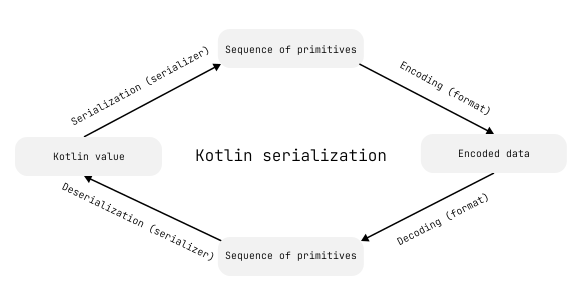
A serializer defines the structure of a Kotlin type in its serialized form, while format implementations such as Json control how that structure is encoded.
Serializers define serialization and deserialization strategies for a type through the KSerializer interface. Kotlin serialization provides serializers for built-in types, collections, and more.
You can use these serializers to serialize values or inspect the structure of their serialized form, while custom serializers let you define that structure yourself.
Obtain serializers
When you annotate a class with @Serializable, the Kotlin serialization plugin generates a KSerializer for that class.
To retrieve this automatically generated serializer, call the generated .serializer() function. You can use a serializer directly with functions such as Json.encodeToString(), or access its descriptor property to inspect the structure of the type's serialized form.
Here's an example that defines a Color class with a single integer property and inspects the structure of its serialized form:
import kotlinx.serialization.*
//sampleStart
@Serializable
data class Color(val rgb: Int)
fun main() {
// Retrieves the generated serializer for the Color class
val colorSerializer: KSerializer<Color> = Color.serializer()
println(colorSerializer.descriptor)
// Color(rgb: kotlin.Int)
}
//sampleEnd
You can use the top-level serializer<T>() function to obtain a serializer for any type, including parameterized ones:
import kotlinx.serialization.*
//sampleStart
@Serializable
@SerialName("Color")
class Color(val rgb: Int)
fun main() {
// Retrieves the serializer for the Map<String, Color>
val stringToColorMapSerializer: KSerializer<Map<String, Color>> = serializer()
// Prints: kotlin.collections.LinkedHashMap(PrimitiveDescriptor(kotlin.String), Color(rgb: kotlin.Int))
println(stringToColorMapSerializer.descriptor)
}
//sampleEnd
For generic classes, if you want to use the generated .serializer() function, provide one KSerializer argument for each type parameter:
import kotlinx.serialization.*
//sampleStart
@Serializable
@SerialName("Color")
class Color(val rgb: Int)
@Serializable
@SerialName("Box")
class Box<T>(val contents: T)
fun main() {
// Calls .serializer() using a KSerializer for the type parameter
val boxedColorSerializer = Box.serializer(Color.serializer())
println(boxedColorSerializer.descriptor)
// Box(contents: Color)
}
//sampleEnd
Obtain serializers for collection types
Unlike classes annotated with @Serializable, collection types like List<T> don't have a generated .serializer() function.
Here's an example that uses the ListSerializer() function to create a serializer for List<String>:
import kotlinx.serialization.*
import kotlinx.serialization.builtins.*
//sampleStart
fun main() {
val stringListSerializer: KSerializer<List<String>> = ListSerializer(String.serializer())
println(stringListSerializer.descriptor)
// kotlin.collections.ArrayList(PrimitiveDescriptor(kotlin.String))
}
//sampleEnd
Create custom serializers
If you want more control over the structure of your serialized data, you can create a custom serializer. A custom serializer lets you define how a type is represented in its serialized form.
Like generated serializers, custom serializers define both serialization and deserialization for a type through the KSerializer interface. To support both, KSerializer extends SerializationStrategy and DeserializationStrategy.
Create a custom primitive serializer
Use a primitive serializer to represent a class as a single primitive value, such as a string or integer.
To create a custom primitive serializer:
Create a custom serializer as an object that implements KSerializer for the serialized class:
object YourSerializer : KSerializer<Type>
Override the descriptor property to define the schema for the serialized data.
Use the PrimitiveSerialDescriptor(serialName, kind) to define the structure of the serialized form as a single primitive value. Specify a uniqueserialName, such as a fully qualified name, and use a PrimitiveKind that matches the encoder and decoder functions used in the serializer:
override val descriptor: SerialDescriptor =
PrimitiveSerialDescriptor("com.example.Type", PrimitiveKind.STRING)
Implement the serialize() function to define how values are converted to their serialized form. Choose an Encoder function that matches the PrimitiveKind in the descriptor:
override fun serialize(encoder: Encoder, value: Type) {
val encodedValue: String = // convert value to a primitive representation
encoder.encodeString(encodedValue)
}
Implement the deserialize() function to define how to convert the serialized data back into an instance of your class. The Decoder provides functions to read the data, such as decodeString().
override fun deserialize(decoder: Decoder): Type {
val decodedValue: String = decoder.decodeString()
// Converts decodedValue back to Type
return ...
}
Use the @Serializable annotation to specify a custom serializer for the class:
@Serializable(YourSerializer::class)
data class Type(val stringValue: String)
Here's an example for a custom primitive serializer that serializes Color as a hexadecimal string:
import kotlinx.serialization.*
import kotlinx.serialization.encoding.*
import kotlinx.serialization.descriptors.*
import kotlinx.serialization.json.*
//sampleStart
// Creates the custom serializer for the Color class
object ColorAsStringSerializer : KSerializer<Color> {
// Defines the schema for the serialized data as a single string
override val descriptor: SerialDescriptor =
// Specifies a unique name and a PrimitiveKind
PrimitiveSerialDescriptor("my.app.Color", PrimitiveKind.STRING)
// Defines how a Color value is serialized as a string
override fun serialize(encoder: Encoder, value: Color) {
// Converts the RGB value to a hexadecimal string
val hexValue = value.rgb.toString(16).padStart(6, '0')
// Encodes the serialized value as a string
encoder.encodeString(hexValue)
}
// Defines how a Color value is deserialized from a string
override fun deserialize(decoder: Decoder): Color {
// Decodes the serialized string value
val hexValue = decoder.decodeString()
// Converts the decoded value back into a Color
return Color(hexValue.toInt(16))
}
}
// Specifies ColorAsStringSerializer as the custom serializer for the Color class
@Serializable(ColorAsStringSerializer::class)
data class Color(val rgb: Int)
fun main() {
val color = Color(0x00FF00)
// Serializes a Color value to JSON
val jsonString = Json.encodeToString(color)
println(jsonString)
// "00ff00"
// Deserializes the JSON string into a Color value
val deserializedColor = Json.decodeFromString<Color>(jsonString)
println(deserializedColor.rgb)
// 65280
}
//sampleEnd
Serialize binary data as Base64 strings
You can use a custom primitive serializer to solve common serialization tasks beyond simple value conversion. One such task is representing binary data as a Base64 string.
Different APIs use different Base64 variants by default. Choose a Kotlin Base64 encoder that matches the expected variant, such as Base64.Default or Base64.Mime.
Here's an example that serializes a ByteArray as a Base64 string with Base64.Default in JSON format:
import kotlinx.serialization.*
import kotlinx.serialization.json.*
import kotlinx.serialization.encoding.Encoder
import kotlinx.serialization.encoding.Decoder
import kotlinx.serialization.descriptors.*
import kotlin.io.encoding.*
//sampleStart
// Creates a custom primitive serializer,
// which represents ByteArray as a Base64 string
object ByteArrayAsBase64Serializer : KSerializer<ByteArray> {
// Uses the default Base64 variant
private val base64 = Base64.Default
// Defines the serialized form as a single STRING primitive
override val descriptor: SerialDescriptor
get() = PrimitiveSerialDescriptor(
"ByteArrayAsBase64Serializer",
PrimitiveKind.STRING
)
// Encodes the ByteArray as a Base64 string
override fun serialize(encoder: Encoder, value: ByteArray) {
val base64Encoded = base64.encode(value)
encoder.encodeString(base64Encoded)
}
// Decodes the Base64 string back into a ByteArray
override fun deserialize(decoder: Decoder): ByteArray {
val base64Decoded = decoder.decodeString()
return base64.decode(base64Decoded)
}
}
@Serializable
data class Value(
// Specifies the custom serializer for this property
@Serializable(ByteArrayAsBase64Serializer::class)
val base64Input: ByteArray
) {
// Implements value-based equality for ByteArray
override fun equals(other: Any?): Boolean {
if (this === other) return true
if (javaClass != other?.javaClass) return false
other as Value
return base64Input.contentEquals(other.base64Input)
}
// Computes hashCode based on array contents
override fun hashCode(): Int {
return base64Input.contentHashCode()
}
}
fun main() {
val string = "PNG_IMAGE_DATA"
val value = Value(string.toByteArray())
// Serializes Value to JSON
val encoded = Json.encodeToString(value)
println(encoded)
// {"base64Input":"UE5HX0lNQUdFX0RBVEE="}
// Deserializes JSON back into Value
val decoded = Json.decodeFromString<Value>(encoded)
println(decoded.base64Input.decodeToString())
// PNG_IMAGE_DATA
}
//sampleEnd
Delegate serialization to another serializer
You can serialize a class as another type by delegating the serialization logic to the serializer for that type. For example, you can use this approach to serialize a class as a non-primitive type, such as an IntArray.
To delegate serialization, create a custom serializer that defines a property for the serializer of the delegated type:
Override the descriptor property to wrap the delegated serializer's descriptor.
Override the serialize() function to convert an instance of your class to the delegated type and use encoder.encodeSerializableValue() function to encode it with the delegated serializer.
Override the deserialize() function to use the decoder.decodeSerializableValue() function with the delegated serializer to decode the value and convert it back into an instance of your class.
Here's an example that serializes a Color class as an IntArray by delegating the serialization logic to IntArraySerializer:
import kotlinx.serialization.*
import kotlinx.serialization.encoding.*
import kotlinx.serialization.descriptors.*
import kotlinx.serialization.builtins.IntArraySerializer
import kotlinx.serialization.json.*
//sampleStart
// Creates a custom serializer that delegates to IntArraySerializer
class ColorIntArraySerializer : KSerializer<Color> {
private val delegateSerializer = IntArraySerializer()
override val descriptor = SerialDescriptor("my.app.Color", delegateSerializer.descriptor)
// Delegates serialization logic to IntArraySerializer
override fun serialize(encoder: Encoder, value: Color) {
val data = intArrayOf(
(value.rgb shr 16) and 0xFF,
(value.rgb shr 8) and 0xFF,
value.rgb and 0xFF
)
encoder.encodeSerializableValue(delegateSerializer, data)
}
// Delegates deserialization and converts IntArray back to Color
override fun deserialize(decoder: Decoder): Color {
val array = decoder.decodeSerializableValue(delegateSerializer)
return Color((array[0] shl 16) or (array[1] shl 8) or array[2])
}
}
@Serializable(ColorIntArraySerializer::class)
class Color(val rgb: Int)
fun main() {
val green = Color(0x00ff00)
println(Json.encodeToString(green))
// [0,255,0]
}
//sampleEnd
While using the array representation isn't conventional in JSON, it can reduce the size of serialized data when used with a ByteArray and a binary format.
Serialize classes with a surrogate class
You can use a surrogate class, a class that matches the serialized form of another class, when you want to:
Change how a class is serialized without modifying the class itself.
Validate the serialized form before creating the original class.
Handle cases where direct serialization doesn't fit the class's rules.
You can make surrogate classes private, and use an init block to enforce constraints on the serial representation of the class. You can also define a custom serial name to keep the serialized type name unchanged.
Let's look at an example that serializes Color as a JSON object with specific ranges for the r, g, and b properties:
// Defines a surrogate that matches the serialized form
@Serializable
@SerialName("Color")
private class ColorSurrogate(val r: Int, val g: Int, val b: Int) {
init {
// Enforces constraints on the serialized form
require(r in 0..255 && g in 0..255 && b in 0..255)
}
}
Similarly to delegating serialization to another serializer, the custom serializer converts the original class to another representation and wraps that representation's automatically generated SerialDescriptor.
To retrieve the generated serializer for the surrogate class, use ColorSurrogate.serializer():
object ColorSerializer : KSerializer<Color> {
// The serialNames of descriptors must be unique
override val descriptor: SerialDescriptor = SerialDescriptor("my.app.Color", ColorSurrogate.serializer().descriptor)
// Converts the original class to the surrogate representation
override fun serialize(encoder: Encoder, value: Color) {
val surrogate = ColorSurrogate((value.rgb shr 16) and 0xff, (value.rgb shr 8) and 0xff, value.rgb and 0xff)
encoder.encodeSerializableValue(ColorSurrogate.serializer(), surrogate)
}
// Converts the surrogate representation back to the original class
override fun deserialize(decoder: Decoder): Color {
val surrogate = decoder.decodeSerializableValue(ColorSurrogate.serializer())
return Color((surrogate.r shl 16) or (surrogate.g shl 8) or surrogate.b)
}
}
Finally, specify the custom serializer for the class:
import kotlinx.serialization.*
import kotlinx.serialization.encoding.*
import kotlinx.serialization.descriptors.*
import kotlinx.serialization.builtins.IntArraySerializer
import kotlinx.serialization.json.*
// Defines a private surrogate class with custom properties
@Serializable
@SerialName("Color")
private class ColorSurrogate(val r: Int, val g: Int, val b: Int) {
init {
// Enforces constraints on the serialized form
require(r in 0..255 && g in 0..255 && b in 0..255)
}
}
// Creates a custom serializer that converts to and from the surrogate
object ColorSerializer : KSerializer<Color> {
// Defines a unique serialName for the wrapped SerialDescriptor
override val descriptor: SerialDescriptor =
SerialDescriptor("my.app.Color", ColorSurrogate.serializer().descriptor)
// Converts the original class to the surrogate representation
override fun serialize(encoder: Encoder, value: Color) {
val surrogate = ColorSurrogate((value.rgb shr 16) and 0xff, (value.rgb shr 8) and 0xff, value.rgb and 0xff)
encoder.encodeSerializableValue(ColorSurrogate.serializer(), surrogate)
}
// Converts the surrogate representation back to the original class
override fun deserialize(decoder: Decoder): Color {
val surrogate = decoder.decodeSerializableValue(ColorSurrogate.serializer())
return Color((surrogate.r shl 16) or (surrogate.g shl 8) or surrogate.b)
}
}
//sampleStart
// Specifies ColorSerializer as the custom serializer for the class
@Serializable(ColorSerializer::class)
class Color(val rgb: Int)
fun main() {
val green = Color(0x00ff00)
println(Json.encodeToString(green))
// {"r":0,"g":255,"b":0}
}
//sampleEnd
Create a custom composite serializer
You can use composite serializers to represent complex data structures, such as classes with multiple properties.
Compared to using a surrogate class, a custom composite serializer lets you define the serialized structure of the original class directly without an additional conversion step. This can also improve performance in some cases, but requires writing more of the serialization logic manually.
To create a custom composite serializer:
Create a serializer as an object that implements KSerializer for the target class:
object YourSerializer : KSerializer<Type>
Override the descriptor property and define the serialization schema with the buildClassSerialDescriptor() function:
override val descriptor: SerialDescriptor =
buildClassSerialDescriptor("com.example.Type") {
// ...
}
Specify each property in the buildClassSerialDescriptor() function with the element() function. The order of elements determines their indices, starting from 0.
The SerialKind of the serializer's descriptor determines what each element() represents. In a class descriptor, an element() represents a property, while in an enum descriptor, an element() represents constants such as RED or GREEN:
override val descriptor: SerialDescriptor =
buildClassSerialDescriptor("com.example.Type") {
element<Int>("first")
element<Int>("second")
}
Implement the serialize() function using the encodeStructure() DSL. Inside its block, the lambda receiver is a CompositeEncoder, which you use to call functions such as encodeIntElement() for each field, following the order defined in the descriptor:
Implement the deserialize() function using the decodeStructure() DSL. Inside its block, the lambda receiver is a CompositeDecoder, which you use to call functions like decodeIntElement() to decode each property.
Most formats allow data to be encoded in an arbitrary order, which can differ from the order of elements in the serializer's descriptor. Use the decodeElementIndex() function to identify which element() to decode. It returns CompositeDecoder.DECODE_DONE when no more elements are left, which you use to stop decoding the current structure:
override fun deserialize(decoder: Decoder): Type =
decoder.decodeStructure(descriptor) {
var first = 0
var second = ""
// Uses decodeElementIndex to ensure correct decoding regardless of order
while (true) {
when (val index = decodeElementIndex(descriptor)) {
0 -> first = decodeStringElement(descriptor, 0)
1 -> second = decodeIntElement(descriptor, 1)
CompositeDecoder.DECODE_DONE -> break
else -> error("Unexpected index: $index")
}
}
Type(first, second)
}
Use the @Serializable(YourSerializer::class) annotation to specify the custom serializer for the class.
Let's look at an example of how to serialize a Color class with multiple properties:
import kotlinx.serialization.*
import kotlinx.serialization.encoding.*
import kotlinx.serialization.descriptors.*
import kotlinx.serialization.json.*
//sampleStart
// Creates a custom serializer for the Color class with multiple properties
object ColorAsObjectSerializer : KSerializer<Color> {
// Defines the schema for the Color class
override val descriptor: SerialDescriptor =
buildClassSerialDescriptor("my.app.Color") {
// Specifies each property with its type and name with the element() function
element<Int>("r")
element<Int>("g")
element<Int>("b")
}
// Serializes the Color in the order specified in the descriptor
override fun serialize(encoder: Encoder, value: Color) =
encoder.encodeStructure(descriptor) {
encodeIntElement(descriptor, 0, (value.rgb shr 16) and 0xff)
encodeIntElement(descriptor, 1, (value.rgb shr 8) and 0xff)
encodeIntElement(descriptor, 2, value.rgb and 0xff)
}
// Deserializes the data back into a Color object
override fun deserialize(decoder: Decoder): Color =
decoder.decodeStructure(descriptor) {
// Temporary variables to hold the decoded values
var r = -1
var g = -1
var b = -1
// Uses decodeElementIndex() since element order may vary by format
while (true) {
when (val index = decodeElementIndex(descriptor)) {
0 -> r = decodeIntElement(descriptor, 0)
1 -> g = decodeIntElement(descriptor, 1)
2 -> b = decodeIntElement(descriptor, 2)
CompositeDecoder.DECODE_DONE -> break
else -> error("Unexpected index: $index")
}
}
// Validates values and reconstructs Color
require(r in 0..255 && g in 0..255 && b in 0..255)
Color((r shl 16) or (g shl 8) or b)
}
}
// Specifies the custom serializer for Color
@Serializable(ColorAsObjectSerializer::class)
data class Color(val rgb: Int)
fun main() {
val color = Color(0x00ff00)
val string = Json.encodeToString(color)
println(string)
// {"r":0,"g":255,"b":0}
require(Json.decodeFromString<Color>(string) == color)
}
//sampleEnd
Encode default values in custom serializers
Plugin-generated serializers check whether the encoder needs to encode values that are equal to their defaults. For example, in JSON, this is controlled by the encodeDefaults property.
To achieve the same behavior in a custom serializer, use the shouldEncodeElementDefault() function with the serializer's descriptor and the index of the element you're encoding.
Here's an example where a custom serializer encodes default Color values when encodeDefaults is enabled:
import kotlinx.serialization.*
import kotlinx.serialization.encoding.*
import kotlinx.serialization.descriptors.*
import kotlinx.serialization.json.*
//sampleStart
// Creates a custom serializer for the Color class with multiple properties
object ColorAsObjectSerializer : KSerializer<Color> {
// Defines the schema for the Color class
override val descriptor: SerialDescriptor =
buildClassSerialDescriptor("my.app.Color") {
// Specifies each property with its type and name with the element() function
element<Int>("r", isOptional = true)
element<Int>("g", isOptional = true)
element<Int>("b", isOptional = true)
}
override fun serialize(encoder: Encoder, value: Color) =
encoder.encodeStructure(descriptor) {
val r = (value.rgb shr 16) and 0xff
val g = (value.rgb shr 8) and 0xff
val b = value.rgb and 0xff
// Encodes r if it differs from its default value,
// or if the encoder needs to encode the first element's default value
if (r != 0 || shouldEncodeElementDefault(descriptor, 0)) {
encodeIntElement(descriptor, 0, r)
}
if (g != 255 || shouldEncodeElementDefault(descriptor, 1)) {
encodeIntElement(descriptor, 1, g)
}
if (b != 0 || shouldEncodeElementDefault(descriptor, 2)) {
encodeIntElement(descriptor, 2, b)
}
}
// Deserializes the data back into a Color object
override fun deserialize(decoder: Decoder): Color =
decoder.decodeStructure(descriptor) {
var r = 0
var g = 255
var b = 0
while (true) {
when (val index = decodeElementIndex(descriptor)) {
0 -> r = decodeIntElement(descriptor, 0)
1 -> g = decodeIntElement(descriptor, 1)
2 -> b = decodeIntElement(descriptor, 2)
CompositeDecoder.DECODE_DONE -> break
else -> error("Unexpected index: $index")
}
}
require(r in 0..255 && g in 0..255 && b in 0..255)
Color((r shl 16) or (g shl 8) or b)
}
}
// Specifies the custom serializer for Color
@Serializable(ColorAsObjectSerializer::class)
data class Color(val rgb: Int = 0x00ff00)
fun main() {
val color = Color()
val stringWithDefaults = Json { encodeDefaults = true }.encodeToString(color)
println(stringWithDefaults)
// {"r":0,"g":255,"b":0}
}
//sampleEnd
Optimize deserialization with sequential decoding
Some formats use a strictly ordered schema and can support sequential decoding. For these formats, you can optimize deserialization with the decodeSequentially() function. This function returns true if the current structure can be decoded in order. Handle that case separately to skip the more complex logic of decoding individual elements out of order.
Here's an example that uses decodeSequentially() to optimize deserialization when possible:
import kotlinx.serialization.*
import kotlinx.serialization.encoding.*
import kotlinx.serialization.descriptors.*
import kotlinx.serialization.json.*
object ColorAsObjectSerializer : KSerializer<Color> {
override val descriptor: SerialDescriptor =
buildClassSerialDescriptor("my.app.Color") {
element<Int>("r")
element<Int>("g")
element<Int>("b")
}
override fun serialize(encoder: Encoder, value: Color) =
encoder.encodeStructure(descriptor) {
encodeIntElement(descriptor, 0, (value.rgb shr 16) and 0xff)
encodeIntElement(descriptor, 1, (value.rgb shr 8) and 0xff)
encodeIntElement(descriptor, 2, value.rgb and 0xff)
}
//sampleStart
override fun deserialize(decoder: Decoder): Color =
decoder.decodeStructure(descriptor) {
var r = -1
var g = -1
var b = -1
// Decodes values directly in order if the format stores data sequentially
@OptIn(ExperimentalSerializationApi::class)
if (decodeSequentially()) {
r = decodeIntElement(descriptor, 0)
g = decodeIntElement(descriptor, 1)
b = decodeIntElement(descriptor, 2)
} else while (true) {
// Ensures correct decoding for formats where elements may be unordered
when (val index = decodeElementIndex(descriptor)) {
0 -> r = decodeIntElement(descriptor, 0)
1 -> g = decodeIntElement(descriptor, 1)
2 -> b = decodeIntElement(descriptor, 2)
CompositeDecoder.DECODE_DONE -> break
else -> error("Unexpected index: $index")
}
}
require(r in 0..255 && g in 0..255 && b in 0..255)
Color((r shl 16) or (g shl 8) or b)
}
//sampleEnd
}
@Serializable(ColorAsObjectSerializer::class)
data class Color(val rgb: Int)
fun main() {
val color = Color(0x00ff00)
val string = Json.encodeToString(color)
println(string)
// {"r":0,"g":255,"b":0}
require(Json.decodeFromString<Color>(string) == color)
}
Create a custom serializer for generic types
To create a custom serializer for a generic class, declare the serializer as a class instead of an object, with one KSerializer constructor parameter for each generic type parameter.
You can delegate the serialization logic for each type parameter to the corresponding KSerializer, so it's encoded according to its own serialization rules.
Let's look at an example using a generic Box<T> class:
import kotlinx.serialization.*
import kotlinx.serialization.encoding.*
import kotlinx.serialization.descriptors.*
import kotlinx.serialization.json.*
//sampleStart
@Serializable(BoxSerializer::class)
data class Box<T>(val contents: T)
// Creates a custom serializer as a class for Box<T>
class BoxSerializer<T>(private val dataSerializer: KSerializer<T>) : KSerializer<Box<T>> {
// Defines a unique serialName for the Box<T> descriptor
override val descriptor: SerialDescriptor =
SerialDescriptor("my.app.Box", dataSerializer.descriptor)
// Delegates serialization and deserialization
override fun serialize(encoder: Encoder, value: Box<T>) = dataSerializer.serialize(encoder, value.contents)
override fun deserialize(decoder: Decoder) = Box(dataSerializer.deserialize(decoder))
}
@Serializable
data class Project(val name: String)
fun main() {
val box = Box(Project("kotlinx.serialization"))
val string = Json.encodeToString(box)
println(string)
// {"name":"kotlinx.serialization"}
println(Json.decodeFromString<Box<Project>>(string))
// Box(contents=Project(name=kotlinx.serialization))
}
//sampleEnd
Use a plugin-generated serializer together with a custom serializer
By default, the Kotlin serialization plugin doesn't generate a serializer if you specify a custom serializer with @Serializable(YourSerializer::class).
You might still want to use the plugin-generated serializer, for example:
Using the plugin-generated serializer as a fallback strategy.
Inspecting the plugin-generated descriptor to access the default structure.
Reusing default serialization behavior in subclasses that don't use a custom serializer.
You can keep the automatically generated serializer alongside your custom one by annotating the serializable class with @KeepGeneratedSerializer. To access the plugin-generated serializer, use the .generatedSerializer() function on the companion object of the serializable class.
Here's an example that uses both a custom serializer and the plugin-generated serializer:
import kotlinx.serialization.*
import kotlinx.serialization.json.*
import kotlinx.serialization.encoding.*
import kotlinx.serialization.descriptors.*
object ColorAsStringSerializer : KSerializer<Color> {
override val descriptor: SerialDescriptor = PrimitiveSerialDescriptor("my.app.ColorAsString", PrimitiveKind.STRING)
override fun serialize(encoder: Encoder, value: Color) {
val string = value.rgb.toString(16).padStart(6, '0')
encoder.encodeString(string)
}
override fun deserialize(decoder: Decoder): Color {
val string = decoder.decodeString()
return Color(string.toInt(16))
}
}
//sampleStart
@OptIn(ExperimentalSerializationApi::class)
@KeepGeneratedSerializer
@Serializable(ColorAsStringSerializer::class)
class Color(val rgb: Int)
fun main() {
val green = Color(0x00ff00)
// Uses the custom serializer
println(Json.encodeToString(green))
// "00ff00"
// Uses the plugin-generated serializer
println(Json.encodeToString(Color.generatedSerializer(), green))
// {"rgb":65280}
}
//sampleEnd
Apply serializers
You can apply custom serializers to your own classes and to third-party types. Third-party types, such as java.util.Date, can't be directly annotated with @Serializable because their source code can't be modified.
Here's an example that serializes Date values as the number of milliseconds since the Unix epoch:
import kotlinx.serialization.*
import kotlinx.serialization.encoding.*
import kotlinx.serialization.descriptors.*
import kotlinx.serialization.json.*
import java.util.Date
import java.text.SimpleDateFormat
//sampleStart
// Can't use @Serializable on Date without access to its source code
object DateAsLongSerializer : KSerializer<Date> {
override val descriptor: SerialDescriptor = PrimitiveSerialDescriptor("my.app.DateAsLong", PrimitiveKind.LONG)
override fun serialize(encoder: Encoder, value: Date) = encoder.encodeLong(value.time)
override fun deserialize(decoder: Decoder): Date = Date(decoder.decodeLong())
}
fun main() {
val kotlin10ReleaseDate = SimpleDateFormat("yyyy-MM-ddX").parse("2016-02-15+00")
// Serializes Date as a Long in milliseconds
println(Json.encodeToString(DateAsLongSerializer, kotlin10ReleaseDate))
// 1455494400000
}
//sampleEnd
Specify a serializer on a property
When a type is used as a property in a serializable class, specify its custom serializer on that property with the @Serializable annotation:
import kotlinx.serialization.*
import kotlinx.serialization.encoding.*
import kotlinx.serialization.descriptors.*
import kotlinx.serialization.json.*
import java.util.Date
import java.text.SimpleDateFormat
object DateAsLongSerializer : KSerializer<Date> {
override val descriptor: SerialDescriptor = PrimitiveSerialDescriptor("my.app.DateAsLong", PrimitiveKind.LONG)
override fun serialize(encoder: Encoder, value: Date) = encoder.encodeLong(value.time)
override fun deserialize(decoder: Decoder): Date = Date(decoder.decodeLong())
}
//sampleStart
@Serializable
class ProgrammingLanguage(
val name: String,
// Specifies the custom serializer for the Date property
@Serializable(DateAsLongSerializer::class)
val stableReleaseDate: Date
)
fun main() {
val data = ProgrammingLanguage("Kotlin", SimpleDateFormat("yyyy-MM-ddX").parse("2016-02-15+00"))
println(Json.encodeToString(data))
// {"name":"Kotlin","stableReleaseDate":1455494400000}
}
//sampleEnd
Specify a serializer on a type
You can also apply the @Serializable annotation directly to a type. You can use this to specify a custom serializer for a type when it's used as a generic type argument, for example in List<Date>:
import kotlinx.serialization.*
import kotlinx.serialization.encoding.*
import kotlinx.serialization.descriptors.*
import kotlinx.serialization.json.*
import java.util.Date
import java.text.SimpleDateFormat
object DateAsLongSerializer : KSerializer<Date> {
override val descriptor: SerialDescriptor = PrimitiveSerialDescriptor("my.app.DateAsLong", PrimitiveKind.LONG)
override fun serialize(encoder: Encoder, value: Date) = encoder.encodeLong(value.time)
override fun deserialize(decoder: Decoder): Date = Date(decoder.decodeLong())
}
//sampleStart
@Serializable
class ProgrammingLanguage(
val name: String,
// Specifies the custom serializer for Date as a generic type argument
val releaseDates: List<@Serializable(DateAsLongSerializer::class) Date>
)
fun main() {
val df = SimpleDateFormat("yyyy-MM-ddX")
val data = ProgrammingLanguage("Kotlin", listOf(df.parse("2023-07-06+00"), df.parse("2023-04-25+00"), df.parse("2022-12-28+00")))
println(Json.encodeToString(data))
// {"name":"Kotlin","releaseDates":[1688601600000,1682380800000,1672185600000]}
}
//sampleEnd
Specify a serializer for a file
To apply a serializer to all properties of a given type in a source file, add the @UseSerializers annotation at the beginning of the file:
@file:UseSerializers(DateAsLongSerializer::class)
This applies the DateAsLongSerializer to all instances of that type within the file, so you don't need to annotate each property separately.
Here's an example:
// Applies the custom serializer to all properties of that type in the file
@file:UseSerializers(DateAsLongSerializer::class)
import kotlinx.serialization.*
import kotlinx.serialization.encoding.*
import kotlinx.serialization.descriptors.*
import kotlinx.serialization.json.*
import java.util.Date
import java.text.SimpleDateFormat
object DateAsLongSerializer : KSerializer<Date> {
override val descriptor: SerialDescriptor = PrimitiveSerialDescriptor("my.app.DateAsLong", PrimitiveKind.LONG)
override fun serialize(encoder: Encoder, value: Date) = encoder.encodeLong(value.time)
override fun deserialize(decoder: Decoder): Date = Date(decoder.decodeLong())
}
// Uses the file-level serializer for the Date property
@Serializable
class ProgrammingLanguage(val name: String, val stableReleaseDate: Date)
fun main() {
val data = ProgrammingLanguage("Kotlin", SimpleDateFormat("yyyy-MM-ddX").parse("2016-02-15+00"))
println(Json.encodeToString(data))
// {"name":"Kotlin","stableReleaseDate":1455494400000}
}
Specify serializers with type aliases
In Kotlin serialization, you usually specify serialization strategies explicitly with the @Serializable annotation. It doesn't provide a global serializer configuration, except for contextual serialization.
If you use the same serializer repeatedly in many places, you can define a typealias with an attached serializer annotation.
This lets you reuse the annotated type without adding the @Serializable annotation at each usage site.
Here's an example of using typealias to apply DateAsLongSerializer and DateAsSimpleTextSerializer to Date:
import kotlinx.serialization.*
import kotlinx.serialization.encoding.*
import kotlinx.serialization.descriptors.*
import kotlinx.serialization.json.*
import java.util.Date
import java.text.SimpleDateFormat
import java.util.TimeZone
//sampleStart
object DateAsLongSerializer : KSerializer<Date> {
override val descriptor: SerialDescriptor = PrimitiveSerialDescriptor("my.app.DateAsLong", PrimitiveKind.LONG)
override fun serialize(encoder: Encoder, value: Date) = encoder.encodeLong(value.time)
override fun deserialize(decoder: Decoder): Date = Date(decoder.decodeLong())
}
// Defines a serializer that encodes Date as a formatted string (yyyy-MM-dd)
object DateAsSimpleTextSerializer: KSerializer<Date> {
override val descriptor: SerialDescriptor = PrimitiveSerialDescriptor("my.app.DateAsSimpleText", PrimitiveKind.LONG)
private val format = SimpleDateFormat("yyyy-MM-dd").apply {
// Sets the time zone to UTC for consistent output
setTimeZone(TimeZone.getTimeZone("UTC"))
}
override fun serialize(encoder: Encoder, value: Date) = encoder.encodeString(format.format(value))
override fun deserialize(decoder: Decoder): Date = format.parse(decoder.decodeString())
}
// Applies global serializers using typealias to avoid annotating each occurrence
typealias DateAsLong = @Serializable(DateAsLongSerializer::class) Date
typealias DateAsText = @Serializable(DateAsSimpleTextSerializer::class) Date
// Uses typealiases to apply custom serializers for Date properties
@Serializable
class ProgrammingLanguage(val stableReleaseDate: DateAsText, val lastReleaseTimestamp: DateAsLong)
fun main() {
val format = SimpleDateFormat("yyyy-MM-ddX")
val data = ProgrammingLanguage(format.parse("2016-02-15+00"), format.parse("2022-07-07+00"))
println(Json.encodeToString(data))
// {"stableReleaseDate":"2016-02-15","lastReleaseTimestamp":1657152000000}
}
//sampleEnd
Implement contextual serialization
By default, serialization strategies are defined at compile time. Contextual serialization allows you to adjust the serialization strategy for specific types at runtime, even when they're nested deep within an object tree.
For example, you can use contextual serialization to serialize java.util.Date in JSON format either as an ISO 8601 String or as a Long, depending on the protocol version being used. This approach is supported by the built-in ContextualSerializer class.
Contextual serialization selects a custom serializer for a type at runtime from a SerializersModule.
To implement contextual serialization:
Mark the property in your serializable class with the @Contextual annotation.
Without the SerializersModule, a SerializationException is thrown during the serialization or deserialization of contextually annotated types that don't have a default serializer.
Create a Json instance and pass the SerializersModule to the serializersModule property.
Here's an example:
import kotlinx.serialization.*
import kotlinx.serialization.encoding.*
import kotlinx.serialization.descriptors.*
import kotlinx.serialization.json.*
import java.util.Date
import java.text.SimpleDateFormat
//sampleStart
// Creates a custom serializer for Date
object DateAsLongSerializer : KSerializer<Date> {
override val descriptor: SerialDescriptor = PrimitiveSerialDescriptor("my.app.Date", PrimitiveKind.LONG)
override fun serialize(encoder: Encoder, value: Date) = encoder.encodeLong(value.time)
override fun deserialize(decoder: Decoder): Date = Date(decoder.decodeLong())
}
@Serializable
class ProgrammingLanguage(
val name: String,
// Specifies contextual serialization for Date
@Contextual
val stableReleaseDate: Date
)
// Defines a SerializersModule and registers the contextual serializer for Date
private val module = SerializersModule {
contextual(DateAsLongSerializer)
}
// Creates a Json instance with the custom SerializersModule
val format = Json { serializersModule = module }
fun main() {
val data = ProgrammingLanguage("Kotlin", SimpleDateFormat("yyyy-MM-ddX").parse("2016-02-15+00"))
println(format.encodeToString(data))
// {"name":"Kotlin","stableReleaseDate":1455494400000}
}
//sampleEnd
Serialize generic classes contextually
To serialize generic classes contextually, you can register a function in the SerializersModule. This function receives the serializers for the generic type arguments and creates the corresponding serializer at runtime.
You can't use a single serializer instance for generic classes because generic type arguments can vary. For example, the following approach only works for Box<Int>, but not for other types like Box<String>:
val incorrectModule = SerializersModule {
// This only works for Box<Int>, but not for Box<String> or other types
contextual(BoxSerializer(Int.serializer()))
}
Instead, register a function that creates a serializer for generic types such as Box<T> based on the serializers of their type arguments. Here's an example:
val correctModule = SerializersModule {
// args[0] is the serializer for T,
// for example Int.serializer() or String.serializer()
contextual(Box::class) { args -> BoxSerializer(args[0]) }
}
What's next
Discover how to transform JSON structure by modifying the JSON element tree instead of creating a custom serializer.