How to build Android and iOS apps (and when to use Kotlin Multiplatform)
When developing for both iOS and Android, the first major decision is architectural: do you go fully native or share code using a cross-platform approach? That choice affects time-to-market, costs, and the level of complexity your team will face over time. Native development maximizes platform control and polish, but it also requires maintaining two codebases. Cross-platform promises faster delivery and reduced costs via shared logic, but also raises valid concerns about performance, flexibility, and long-term maintainability.
This is not just a theoretical debate. According to the State of Developer Ecosystem 2025, the use of cross-platform and shared-code techniques more than doubled between 2024 and 2025, which suggests that more teams are looking for ways to reuse code while maintaining native-quality experiences.
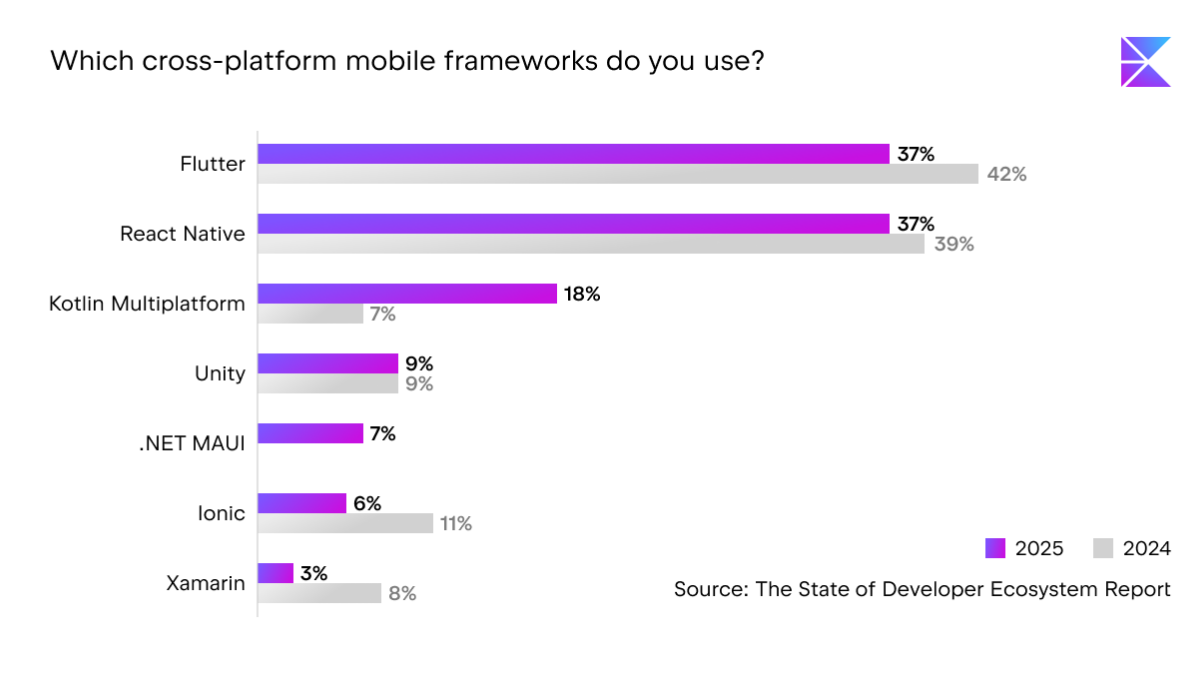
In this article, we'll take a look at native and cross-platform approaches in practical terms. Rather than offering a one-size-fits-all solution, we'll go over the trade-offs teams encounter in planning, architecture, and delivery. You will get a clearer comparison and a better basis for choosing the option that best suits your product, team, and constraints.
How to build Android and iOS apps: three main architecture options
Once you've decided to release on both iOS and Android, the next strategic consideration is how to structure development across platforms. This decision will influence how you build, ship, and evolve your app over time.
Fully native development
Fully native development treats iOS and Android as different products. You create one app with Apple's tools and frameworks and another with Google's, using each platform's native languages, UI systems, and SDKs. The two codebases may share ideas and designs, but they remain technically distinct, and each platform evolves within its own ecosystem and release cycle.
Cross-platform frameworks (Flutter, React Native, etc.)
Cross-platform frameworks, such as Flutter and React Native, aim to unify development around a single codebase. This approach allows teams to share both business logic and UI code, with a cross-platform layer rendering the app across operating systems. The promise is straightforward: one codebase, two platforms, and a more efficient path from idea to release.
Flexible code sharing (Kotlin Multiplatform)
Kotlin Multiplatform (KMP) offers a broader range of code-sharing options. Instead of requiring an all-or-nothing decision, it enables teams to share only what is relevant to their product while maintaining the flexibility to build fully native experiences.
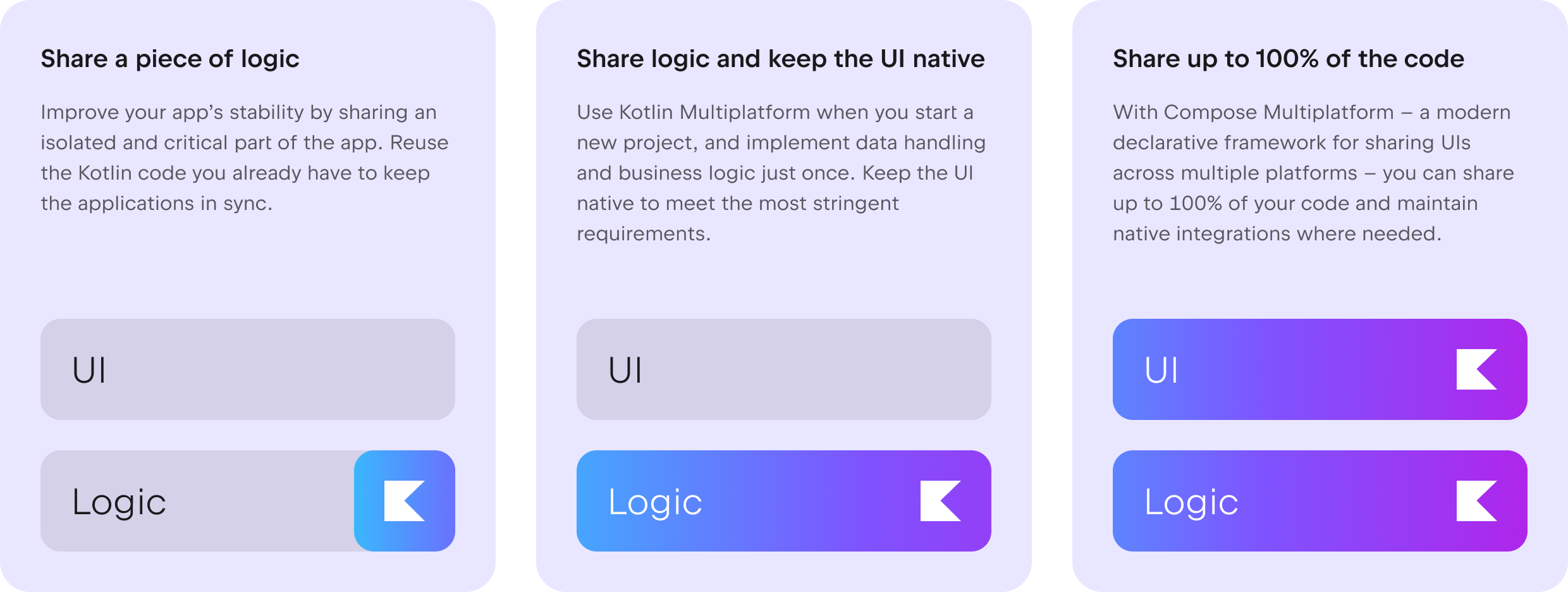

In the following sections, we'll look at how these three approaches work in real projects and what they mean for day-to-day development.
Fully native development for Android and iOS
Fully native development involves creating two distinct applications: one for iOS with Apple's tools and one for Android with Google's. Each platform has its own codebase, development pipeline, and release process. In practice, you're building two products that solve the same problem but live within different ecosystems.
The main benefit of this approach is platform fidelity. Native apps use the platform's UI frameworks, interaction patterns, and accessibility technologies directly, which makes it easier to develop experiences that feel good on each device. Since there is no abstraction layer in between, animations, gestures, and navigation all work as expected with no performance overhead.
Another major advantage is quick access to platform APIs. When Apple or Google introduces new system features, SDKs, or hardware capabilities, native apps can immediately incorporate them. There is no need to wait for a cross-platform layer to catch up and expose those APIs, which is important for products that require cutting-edge OS capabilities or deep system integration.
Considerations
One of the trade-offs is increased maintenance costs. Two codebases inevitably lead to redundant effort in feature development, bug fixes, testing, and long-term evolution. Maintaining two codebases also requires hiring specialists for each platform, which increases costs and slows down improvements that need to be implemented everywhere at once.
Native development is a strong choice when platform-specific UX is a key differentiator, you want early or deep access to OS features, or you already have mature, independent iOS and Android teams. It's also a good solution for products with limited shared logic but high UI, performance, or hardware integration requirements.
Frameworks for cross-platform mobile development
Cross-platform frameworks take a straightforward approach to cross-platform development: rather than creating two different interfaces, they use a single rendering layer to power the app on both iOS and Android. Teams create a single set of UI components and a generally consistent application layer, which the framework converts into something that each platform can display and interact with. In practice, the user interface is as reusable as the business logic.
The most obvious advantage is increased UI code reuse. Large chunks of code, sometimes even the majority, can be included in a single codebase. This makes it much easier to align features and roll out updates to both platforms simultaneously. As a result, teams often achieve faster parity between iOS and Android, since new features, fixes, and UI upgrades are typically implemented only once.
This paradigm is particularly appealing when consistency and delivery speed are more important than fine-grained platform specifics. A unified UI layer eliminates collaboration overhead between platform teams while also simplifying planning, testing, and release management. From a product standpoint, it also reduces the risk of one platform falling behind the other in functionality or visual design.
Considerations
However, cross-platform frameworks come with abstraction trade-offs. The rendering layer resides between your code and the operating system, so you're not directly working with platform UI frameworks. While this abstraction smooths out many differences, it may make certain native behaviors, interactions, or edge cases more difficult to define or tune. When you need to go beyond what the abstraction provides, you frequently have to drop down into platform-specific code.
There is also ecosystem and plugin dependence. The framework and its accompanying tooling support new OS features, device capabilities, and third-party SDKs. If something isn't available yet, teams may have to wait, build custom connectors, or adjust their roadmap.
In short, cross-platform frameworks optimize for cross-platform reuse and synchronization, with clear benefits as well as structural limits.
Kotlin Multiplatform: flexible code sharing
Kotlin Multiplatform works like a range of options rather than a single architectural choice. It doesn’t require an all-or-nothing commitment to a shared codebase. Teams can decide which parts of their code to share and when to share them.
At one end of this range, Compose Multiplatform, a declarative UI framework within the Kotlin Multiplatform ecosystem, allows teams to share user interfaces across multiple platforms. This can be useful when a project benefits from a unified design system, consistent interaction patterns, and a single presentation layer across iOS and Android, while still compiling to native targets. In this setup, screens, navigation, and UI state reside in shared code, while each platform retains its application entry points and OS-specific integrations.

You can limit sharing to a small, well-defined part of the system, like a pricing engine, validation module, or sync policy, where identical behavior is required on both platforms. This enables incremental adoption: teams can start with a single shared module, measure its impact, and expand over time. The boundary between shared and platform-specific code can shift as requirements change.
This is a logical choice for teams with Kotlin experience. Android stays in Kotlin, iOS stays native by using Swift or SwiftUI. The goal isn’t to maximize code sharing, but to share code as needed to lower cost or risk without constraining product decisions.
In practice, Kotlin Multiplatform isn’t about choosing between native and cross-platform. It’s about keeping architecture flexible and sharing code only where it delivers clear, practical value.

Considerations
Requires clear architecture boundaries: Teams need to decide what belongs in shared vs. platform code, which adds some architectural planning.
Cross-platform coordination: Shared modules mean Android and iOS teams need to align on releases and changes to shared logic.
Ecosystem maturity varies by use case: Some libraries or integrations may still require platform-specific implementations.
Comparing native, cross-platform frameworks, and Kotlin Multiplatform
The following table summarizes the key differences between native development, cross-platform frameworks, and Kotlin Multiplatform.
Fully native development | Cross-platform frameworks (Flutter, React Native) | Flexible code sharing (Kotlin Multiplatform) | |
|---|---|---|---|
Code sharing | None | Most or all code shared | Selective: from small modules to most of the app |
UI strategy | Fully native for each platform (SwiftUI/UIKit, Compose/Views) | Single shared UI layer rendered or bridged to native | Either fully native UIs or shared UI with Compose Multiplatform |
API access | Full, immediate access to all platform APIs | Indirect, via plugins/bridges | Full access through platform layers; shared code stays platform-agnostic |
Best fit | Apps where platform-specific UX, performance, or deep OS | Teams prioritizing one codebase and faster feature parity across platforms | Teams that want native UX but also want to reduce duplication in business logic |
Main tradeoff | Duplicate business logic, higher development and maintenance costs | Less control over native UX and reliance on framework/plugin ecosystem | Requires clear architectural boundaries and some cross-platform coordination |
With Kotlin Multiplatform, teams choose what to share and when. Maybe you want to start small, with just business logic or a portion of your UI, and then gradually integrate more over time. This makes sharing incremental and reversible rather than a one-time bet, turning architecture into a flexible, evolving decision instead of a fixed commitment.
You can dive deeper into Kotlin Multiplatform in these comparisons: Kotlin Multiplatform and Flutter, and Kotlin Multiplatform vs. React Native.
How to choose the right approach for Android and iOS apps
The choice between fully native development and different cross-platform solutions is a key architectural decision.
Importance of platform-native UX
The first dimension to consider is the importance of platform-native UX. If your product relies on strict adherence to platform norms, specialized interactions, or deep OS integration, approaches that maintain complete native UI control reduce long-term risk. If visual and interaction differences between platforms are less important, a shared UI layer may be a reasonable tradeoff for increased reuse.
Degree of logic sharing required
Another consideration is the required level of logic sharing. Some products require similar business rules, data models, and workflows across platforms, while others benefit from sharing major portions of the UI layer. You and your team need to clarify which components of the system must perform identically and which are expected to differ. This helps to prevent both under-sharing (duplicated critical logic) and over-sharing (forcing false homogeneity).
Reversibility of architectural decisions
The reversibility of architectural decisions is another important consideration. Some options lock you into a specific structure that will be expensive to change later, particularly when the UI and underlying functionality are inextricably linked. Architectures that allow you to gradually shift the boundary between common and platform-specific code lower the cost of future pivots and refactorings.
Expected product lifespan and evolution
Finally, consider the predicted lifespan and evolution of the product. Products that will undergo significant changes, add features, or adapt to new platform capabilities benefit from designs that keep responsibilities clearly separated and dependencies limited. The goal is not to maximize reuse right away, but to select a method that makes change manageable as the product grows and shifts.
Common mistakes in dual-platform development
Treating platforms as identical
One of the most common mistakes is treating all platforms as identical. iOS and Android have different user expectations, system behaviors, and technical limits. Using the same interaction patterns or flows on both platforms can make the experience feel slightly off everywhere, even when feature parity is achieved. Functional consistency is more important than visual or behavioral homogeneity.
Oversharing UI without UX consideration
Another common issue is oversharing UI without considering the UX impact. Sharing screens and components might reduce development time, but it can also flatten platform norms and limit the use of native interaction patterns. When user interfaces become overly generic, the product suffers in terms of usability, accessibility, and long-term polish.
Underestimating maintenance costs
Teams often underestimate maintenance costs. Dual-platform apps do more than just double testing and release work; they also add coordination overhead, expose more edge cases, and increase the range of OS versions and devices that need support. Ignoring this reality results in weak release processes and increasing technical debt.
Locking into irreversible architecture
Committing to an irreversible architecture is another structural mistake. Depending on the approach you take, changing your mind later about what should be shared versus what's platform-specific can be costly. When product direction or platform needs change, these rigid boundaries turn routine evolution into large refactoring efforts.
Ignoring team expertise
Finally, neglecting team expertise leads to unnecessary friction. An architecture that looks good on paper may fail in practice if it does not match the skills, experience, and workflows of the people building it. Sustainable velocity is typically achieved by aligning technology choices with, rather than against, the team's actual workflow.
FAQ
Can I create Android and iOS apps from one codebase?
Yes, depending on the approach you take, you can build for both platforms from the same codebase. Kotlin Multiplatform allows you to choose what to share. You can share both logic and UIs, share logic while keeping the UI fully native, or share a piece of logic.
Is cross-platform better than native?
Neither approach is universally better; they optimize for different goals. Cross-platform solutions often reduce duplication and speed up feature parity, but native development provides full control over platform behavior and user experience. The right choice depends on how important native UX, performance characteristics, and platform-specific integrations are to your project.
What can you share with Kotlin Multiplatform?
With Kotlin Multiplatform, you can choose what to share. You can use Kotlin with Compose Multiplatform to share up to 100% of your app code – including UI – while still integrating with native APIs. Alternatively, you can share logic but keep UIs native. Kotlin Multiplatform allows you to share everything from small, targeted modules to entire application components. Domain models, business rules, networking, caching, and state management are examples of code that can be shared.
Is Kotlin Multiplatform production-ready?
Yes, Kotlin Multiplatform is used in production by numerous teams to share business logic and, in certain cases, UI. The core tooling and language support remain stable, while the maturity of specialized libraries and use cases varies. As with any architecture decision, it is critical to test it against your product's technical and organizational needs.

Conclusion
There is no single correct way to build Android and iOS apps. The key is to treat this as an architectural decision rather than a tooling preference. Platform-native UX requirements, the need for consistent business logic, and the cost of future change should guide where you draw the boundary between shared and platform-specific code.
Rather than optimizing for maximum reuse, optimize for adaptability. Approaches like Kotlin Multiplatform that let you adjust what is shared over time tend to age better as products evolve. The right choice supports today’s goals while keeping tomorrow’s changes manageable.