Custom compiler plugins
Compiler plugins hook into the compilation process to analyze or change code while it's being compiled, without modifying the compiler itself. For example, they can annotate code or generate new code to make it compatible with other frameworks or APIs.
Before you create your own custom compiler plugin, check the list of available compiler plugins to see if one is already available that suits your use case.
You can also check whether you can use the Kotlin Symbol Processing (KSP) API or an external linter such as Android lint to achieve your goals.
If you still can't find what you need, you can create a custom compiler plugin. Be aware that the Kotlin compiler plugin API is unstable. You need to invest significant ongoing effort to maintain it, since each new compiler release introduces breaking changes.
The Kotlin compiler and compiler plugins
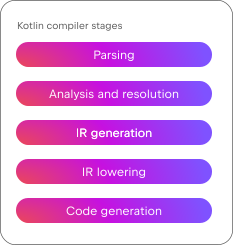
The Kotlin compiler:
Parses the source code and turns it into a structured syntax tree.
Analyzes and resolves the code by determining what it means, resolving names, checking types, and enforcing visibility rules.
Generates an Intermediate Representation (IR), a data structure that acts as a bridge between source code and machine code.
Progressively lowers the IR into simpler forms.
Translates the lowered IR into target-specific output, such as JVM bytecode, JavaScript, or native machine code.
Plugins can affect the initial compiler stages through the frontend API, changing how the compiler resolves code. For example, a plugin can add annotations or introduce new methods without bodies, or change visibility modifiers. These changes are visible in the IDE.
Plugins can also affect the later stages through the backend API, modifying the behavior of declarations. These changes appear in the binaries produced after compilation completes.
In practice, compiler plugins affect the stages from analysis and resolution through code generation, covering both frontend and backend. For example, the frontend part generates declarations, and the backend part adds bodies for those declarations.
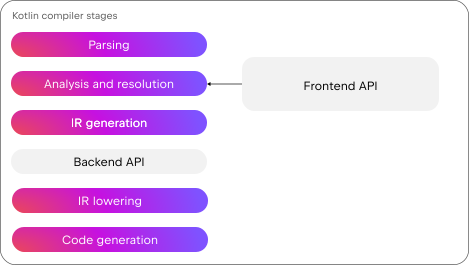
The Kotlin serialization plugin is a good example. The plugin's frontend part adds a companion object and a serializer function, as well as checks to prevent name conflicts. The backend part implements the desired serialization behavior through KSerializer objects.
Kotlin compiler plugin template
To start writing a custom compiler plugin, you can use the Kotlin compiler plugin template. You then register extension points from the frontend and backend plugin APIs.
Frontend plugin API
The frontend plugin API, also known as frontend intermediate representation (FIR), has the following specialized extension points to customize resolution:
Extension name | Description |
|---|---|
Adds custom compiler checkers. | |
Generates new declarations. | |
Registers custom components in the | |
Defines new families of functional types. | |
Reads and writes information to declaration metadata. | |
Modifies declaration status attributes such as visibility or modality. | |
Adds new supertypes to an existing class. | |
Adds special attributes to certain types based on their type annotations. |
IDE integration
Resolution changes affect IDE behavior such as code highlighting and suggestions, so it's important that your plugin is compatible with the IDE. Each version of IntelliJ IDEA and Android Studio includes a development version of the Kotlin compiler. This version is specific to the IDE and is not binary compatible with the released Kotlin compiler. As a result, when you update your IDE, you also need to update your compiler plugin to keep it working. For this reason, community plugins aren't loaded by default.
To ensure that your custom compiler plugin works with different IDE versions, test it against each IDE version and fix any issues you find.
Supporting multiple IDE versions could become easier if a devkit for Kotlin compiler plugins were available. If you're interested in this feature, share your feedback in our issue tracker.
Backend plugin API
The backend plugin API, also known as IR, has a single extension point: IrGenerationExtension. Use this extension point and override the generate() function to add bodies to declarations already generated by the frontend or change existing declaration bodies.
Changes made through this extension point are not checked by the compiler. You must ensure that your changes don't break the compiler's expectations at this stage. For example, you might accidentally introduce an invalid type, an incorrect function reference, or a reference outside the correct scope.
Explore backend plugin code
You can explore the Kotlin serialization plugin code to see what backend plugin compiler code looks like in practice. For example, SerializableCompanionIrGenerator.kt fills in missing bodies for key serializer members. One example is the generateChildSerializersGetter() function, which collects a list of KSerializer expressions and returns them in an array.
Check your backend plugin code for problems
You can check for problems in your backend plugin code in three ways:
Verify the IR
Build the IR tree and enable the
Xverify-ircompiler option. This option has a performance impact on compilation speed, so use it only during testing.Dump and compare IR output
Create a dump file after the IR lowering compilation stage with the
-Xphases-to-dump-before=ExternalPackageParentPatcherLoweringcompiler option. For the JVM backend, configure the dump directory with the-Xdump-directory=<your-file-directory>compiler option. Write the expected code manually, generate another dump file, and compare the two to see if there are differences.Debug the compiler code
In the
convertToIr.ktfile, add breakpoints in theconvertToIrAndActualize()function and run the compiler in debug mode to get more detailed information during compilation.
Test your plugin
Once you implement your plugin, test it thoroughly. The Kotlin compiler plugin template is already set up to use the Kotlin compiler test framework. You can add tests in the following directories:
compiler-plugin/testDatacompiler-plugin/testData/boxfor code generation testscompiler-plugin/testData/diagnosticsfor diagnostic tests
When a test runs, the framework:
Parses the test source file. For example,
anotherBoxTest.ktBuilds the FIR and IR for each file.
Writes these as textual dump files. For example,
anotherBoxTest.fir.txtandanotherBoxTest.fir.ir.txt.Compares these files with previously created files, if they exist.
You can use these files to check if any changes in the generated diff weren't intended. If there are no problems, the new dump files become your latest golden files: an approved and trusted source that you can compare future changes against.
Get help
If you run into issues developing a custom compiler plugin, reach out in Kotlin Slack in the #compiler channel. We can't promise a solution but we will try to help if we can.