Interoperability with Swift using Swift export
Kotlin's interoperability with Swift through Swift export is currently in Alpha. Swift export allows you to export Kotlin sources directly and call Kotlin code from Swift idiomatically, eliminating the need for Objective-C headers.
Swift export makes multiplatform development for Apple targets more streamlined. For example, if you have a Kotlin module with top-level functions, Swift export enables clean, module-specific imports, removing the confusing Objective-C underscores and mangled names.
Current Swift export features are:
Multi-module support. Each Kotlin module is exported as a separate Swift module, simplifying function calls.
Package support. Kotlin packages are explicitly preserved during export, avoiding naming conflicts in the generated Swift code.
Type aliases. Kotlin type aliases are exported and preserved in Swift, improving readability.
Enhanced nullability for primitives. Unlike Objective-C interop, which required boxing types like
Int?into wrapper classes likeKotlinIntto preserve nullability, Swift export converts nullability information directly.Overloads. You can call Kotlin's overloaded functions in Swift without ambiguity.
Flattened package structure. You can translate Kotlin packages into Swift enums, removing the package prefix from generated Swift code.
Module name customization. You can customize the resulting Swift module names in the Gradle configuration of your Kotlin project.
Concurrency support. You can seamlessly call suspending Kotlin code from Swift and export
kotlinx.coroutinesflows as Swift'sAsyncSequenceout of the box.
Enable Swift export
Swift export is currently in Alpha and still incomplete, so breaking changes are expected. To try it out, configure the build file in your Kotlin project and set up Xcode to integrate Swift export.
Configure Kotlin project
You can use the following build file in your project as a starting point for setting up Swift export:
The Kotlin compiler automatically generates all the necessary files (including swiftmodule files, static .a library, a header file, and a modulemap file) and copies them into the app's build directory, which you can access from Xcode.
Configure Xcode project
To configure Xcode to integrate Swift export into your project:
In Xcode, open the project settings.
On the Build Phases tab, locate the Run Script phase with the
embedAndSignAppleFrameworkForXcodetask.Replace the script with the
embedSwiftExportForXcodetask in the run script phase:./gradlew :<Shared module name>:embedSwiftExportForXcode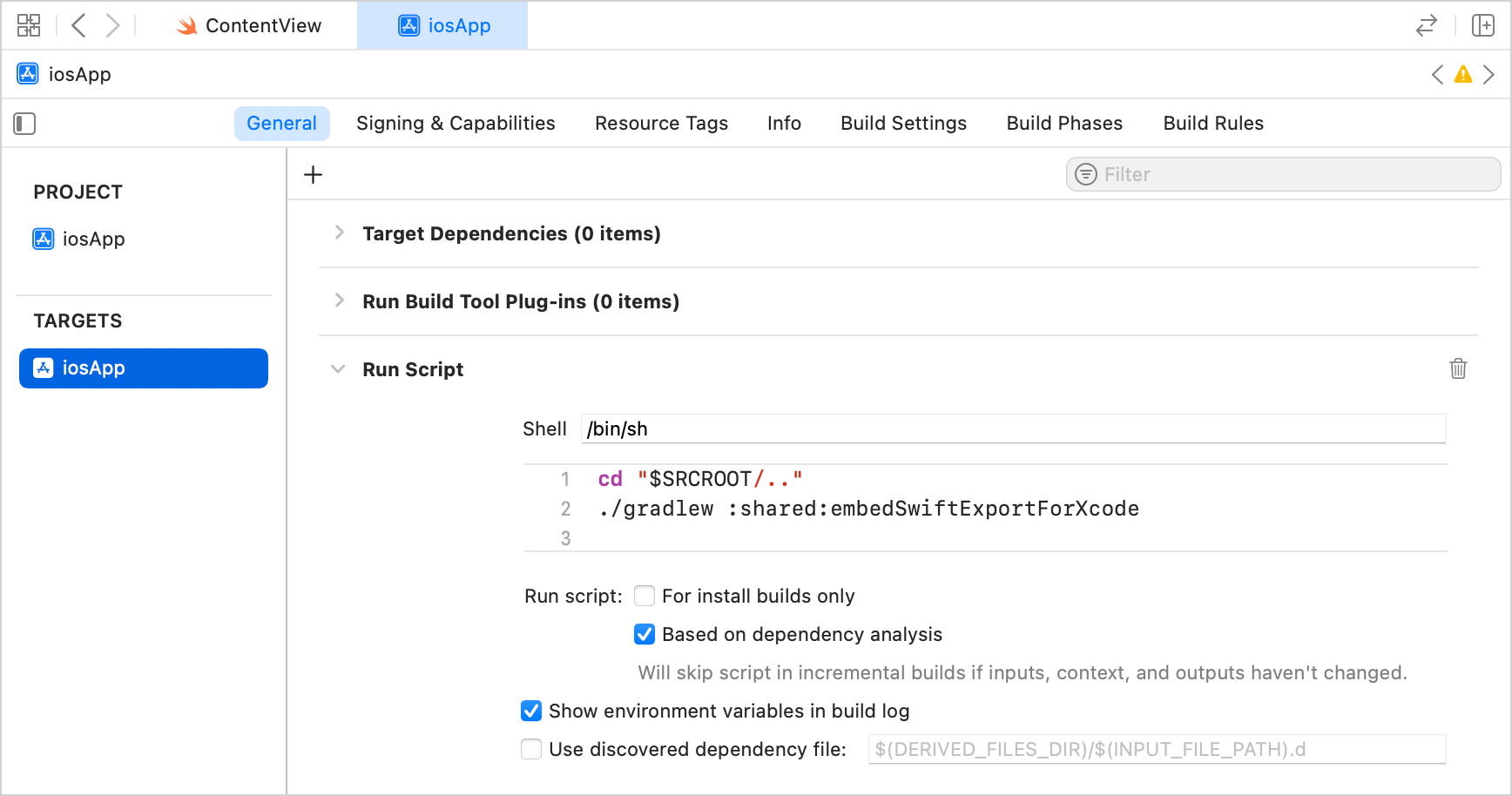
Build the project. The build generates Swift modules in the output directory.
Current limitations
Swift export currently works only in projects that use direct integration to connect the iOS framework to the Xcode project. This is a standard configuration for Kotlin Multiplatform projects created with the Kotlin Multiplatform plugin in IntelliJ IDEA or through the web wizard.
Other known issues:
Types that inherit from
List,Set, orMapare ignored during the export (KT-80416).Inheritors of
List,Set, orMapcannot be instantiated on the Swift side (KT-80417).When exported to Swift, Kotlin generic type parameters are type-erased to their upper bounds.
No IDE migration tips or automation are available.
When using declarations that require opt-in, you must add an explicit
optIncompiler option at the module level to your Gradle build file. For example, for thekotlinx.datetimelibrary:swiftExport { moduleName = "Shared" export("org.jetbrains.kotlinx:kotlinx-datetime:0.8.0") { moduleName = "KotlinDateTime" flattenPackage = "kotlinx.datetime" } } // Add a separate opt-in block at the module level compilerOptions { optIn.add("kotlin.time.ExperimentalTime") }
Mappings
The table below shows how Kotlin concepts are mapped to Swift.
Kotlin | Swift |
|---|---|
| |
| |
| |
| |
| |
Function | |
| |
| |
Property | |
Initializer | |
Nested enum | |
|
|
|
|
|
|
|
|
|
|
|
|
|
|
|
|
|
|
|
|
|
|
|
|
|
|
|
|
|
Declarations
Classes
Swift export supports only final classes that directly inherit from Any, like class Foo(). They are translated to Swift classes that inherit from a special KotlinBase class:
Objects
Objects are translated to Swift classes with a private init and static shared accessor:
Type aliases
Kotlin type aliases are exported as is:
Enums
Kotlin enum class declarations are exported as regular native Swift enum types:
Sealed classes and interfaces
Sealed hierarchies defined in Kotlin are mapped to Swift enums, enabling exhaustive switch statements.
Swift export generates a .sealedType() method on each sealed type. This method returns a Swift enum whose cases match the direct subclasses of the sealed hierarchy. You can nest these calls to match deeper levels of the hierarchy.
For example, declare a sealed interface with a class hierarchy in Kotlin:
On the Swift side, you can use an exhaustive switch without a default case:
Because the switch is exhaustive, the compiler warns you if a new subclass is added to the sealed hierarchy, so you can handle it immediately instead of relying on a default case for switch.
Functions
Swift export supports simple top-level functions and methods:
For Kotlin's extension functions, the receiver parameter becomes an ordinary Swift parameter in the first position:
Kotlin's functions with vararg are mapped to Swift's variadic function parameters:
Properties
Kotlin properties are translated to Swift properties:
Constructors
Constructors are translated to Swift initializers:
Types
kotlin.Nothing
The Kotlin Nothing type is translated to the Never type:
Classifier types
Swift export currently supports only final classes that directly inherit from Any.
Packages
Kotlin packages are translated to nested Swift enums to avoid name collisions:
Concurrency
Suspending functions
You can call suspending Kotlin code from Swift. Kotlin suspending functions and suspending functional types are exported as Swift's async counterparts:
Flows
You can also export kotlinx.coroutines flows as Swift's AsyncSequence:
Coroutine dispatchers
By default, when you call a Kotlin suspending function from Swift or use the asAsyncSequence function, Kotlin creates a coroutine context that uses the Dispatchers.Default dispatcher and executes the exported code there.
To run the exported code on a different dispatcher, use the withContext() function to switch the coroutine context in Kotlin. For example:
Cross-language inheritance
Swift export supports cross-language inheritance. A common use case for this feature is the reverse import pattern, where you define a contract in Kotlin and provide platform-specific implementations on the Swift side. This is especially useful when you need to use pure Swift libraries that can't be directly imported into Kotlin.
To implement the pattern, you need to declare a Kotlin interface and a Kotlin superclass that the Swift implementation can inherit from. You then implement the interface in Swift and pass the Swift object to Kotlin functions that accept that interface. For example, for the CryptoKit library:
On the Kotlin side, declare an interface, a function that accepts it, and an
openbase class:// Kotlin interface CryptoProvider { fun hashMD5(input: String): String } fun processHash(provider: CryptoProvider, input: String): String = provider.hashMD5(input) open class SwiftBaseOn the Swift side, inherit from the exported
SwiftBaseclass, implement the interface using a pure Swift library, and pass the object back to Kotlin:// Swift import CryptoKit final class IosCryptoProvider: SwiftBase, CryptoProvider { func hashMD5(input: String) -> String { guard let data = input.data(using: .utf8) else { return "failed" } return Insecure.MD5.hash(data: data).description } } let provider = IosCryptoProvider() // Calls the Kotlin function, which calls hashMD5() back in Swift print(processHash(provider: provider, input: "Hello, world!"))
When Kotlin receives the Swift object, it treats it like an implementation of a regular Kotlin interface, calling the Swift code directly.
Evolution of Swift export
We're planning to expand and gradually stabilize Swift export in future Kotlin releases, improving interoperability between Kotlin and Swift. You can leave your feedback:
In Kotlin Slack – get an invite and join the #swift-export channel.
Report issues in YouTrack.