iOS integration methods
You can integrate a Kotlin Multiplatform shared module into your iOS app. For that, you generate an iOS framework from the shared module and then add it as a dependency to the iOS project:
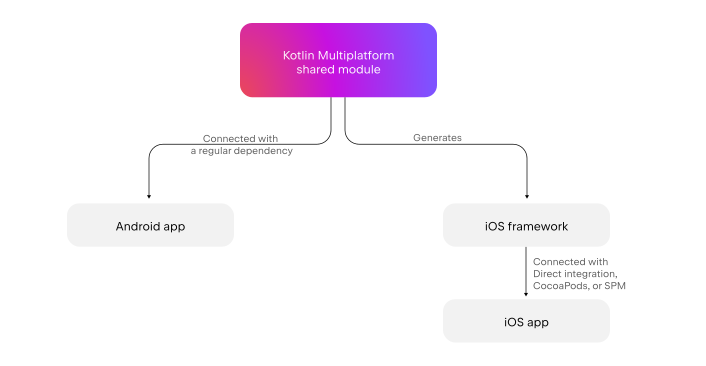
It's possible to consume this framework as a local or remote dependency. Choose local integration if you want to have full control over the entire codebase and get instant updates to final applications when the common code changes.
If you want to explicitly separate the code base of your final application from the common code base, set up remote integration. In this case, the shared code will be integrated into final applications like a regular third-party dependency.
Local integration
In a local setup, there are two main integration options. You can use direct integration through a special script, which makes the Kotlin build a part of the iOS build. If you have Pod dependencies in your Kotlin Multiplatform project, take the CocoaPods integration approach.
Direct integration
You can connect the iOS framework directly from the Kotlin Multiplatform project by adding a special script to your Xcode project. The script is integrated into the build phase of your project's build settings.
This integration method can work for you if you do not import CocoaPods dependencies in your Kotlin Multiplatform project.
If you use the Kotlin Multiplatform IDE plugin, direct integration is applied by default.
For more information, see Direct integration.
SwiftPM integration with a local package
Your KMP iOS framework can depend on a local Swift package through the Swift Package Manager.
This integration method can work for you if:
You have a mono repository setup with an iOS project that uses Swift packages.
You don't have irreplaceable CocoaPods dependencies in your Kotlin Multiplatform project.
To learn how to add a local Swift package dependency to your project, see Adding Swift packages as dependencies.
CocoaPods integration with a local podspec
You can connect the iOS framework from the Kotlin Multiplatform project through CocoaPods, a popular dependency manager for Swift and Objective-C projects.
This integration method works for you if:
You have a mono repository setup with an iOS project that uses CocoaPods.
You import CocoaPods dependencies in your Kotlin Multiplatform project.
To learn how to set up a workflow with a local CocoaPods dependency, see CocoaPods overview and setup.
Remote integration
For remote integration, your project might use the Swift Package Manager (SwiftPM) or the CocoaPods dependency manager to connect the iOS framework from a Kotlin Multiplatform project.
SwiftPM with XCFrameworks
You can both export your XCFramework from a Kotlin Multiplatform project and import remote Swift packages as dependencies into a KMP project:
For instructions on how to make and distribute a Swift package out of your XCFramework, see Swift package export setup.
To learn how to add Swift packages as dependencies, see the Swift PM import documentation.
CocoaPods integration with XCFrameworks
You can build XCFrameworks with the Kotlin CocoaPods Gradle plugin and then distribute shared parts of your project separately from mobile apps through CocoaPods.
For more information, see Build final native binaries.