Use platform-specific APIs
In this article, you'll learn how to use platform-specific APIs when developing multiplatform applications and libraries.
Kotlin Multiplatform libraries
Before writing code that uses a platform-specific API, check whether you can use a multiplatform library instead. This type of library provides a common Kotlin API that has a different implementation for different platforms.
There are already many libraries available that you can use to implement networking, logging, and analytics, as well as access device functionality and more. Browse libraries on klibs.io, the Kotlin Multiplatform library search platform.
Expected and actual functions and properties
Kotlin provides a language mechanism to access platform-specific APIs while developing common logic: expected and actual declarations.
With this mechanism, the common source set of a multiplatform module defines an expected declaration, and every platform source set must provide the actual declaration that corresponds to the expected declaration. The compiler ensures that every declaration marked with the expect keyword in the common source set has the corresponding declarations marked with the actual keyword in all targeted platform source sets.
This works for most Kotlin declarations, such as functions, classes, interfaces, enumerations, properties, and annotations. This section focuses on using expected and actual functions and properties.
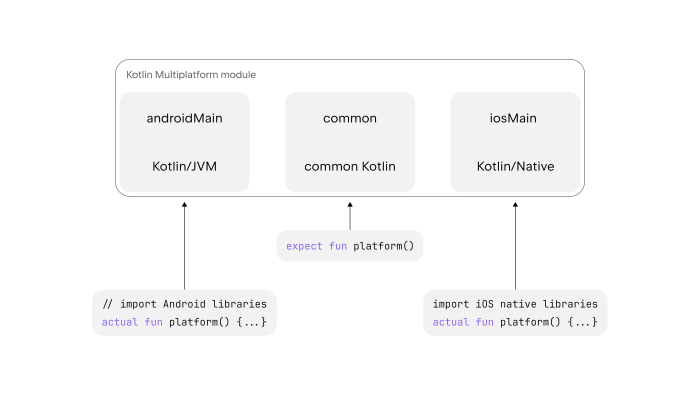
In this example, an expected platform() function is defined in the common source set and has actual implementations in the platform source sets. While generating the code for a specific platform, the Kotlin compiler merges the expected and actual declarations. The result is a platform() function with the implementation for the target platform.
The expected and actual declarations must be defined in the same package to be merged into one declaration in the resulting platform code. This way, any invocation of the expected platform() function in common code will correspond to the correct actual implementation.
Similar to expected and actual functions, expected and actual properties allow you to use different values on different platforms. Expected and actual functions and properties are most useful for simple cases.
Example: Generate a UUID
Let's assume that you are developing iOS and Android applications using Kotlin Multiplatform, and you need a mechanism to generate a universally unique identifier (UUID).
To do so, declare the expected function randomUUID() with the expect keyword in the common source set of your Kotlin Multiplatform module. Do not include any implementation code with the expect declaration.
In each platform-specific source set (iOS and Android), provide the actual implementation for the randomUUID() function expected in the common module. Use the actual keyword to mark these actual implementations.
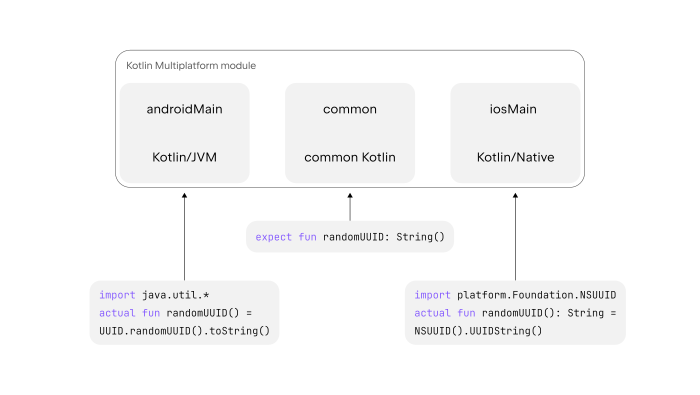
The following snippets show the implementations for Android and iOS. Platform-specific code uses the actual keyword and the same name for the function:
The Android implementation uses the APIs available on Android, while the iOS implementation uses the APIs available on iOS. You can access iOS APIs from Kotlin/Native code.
While producing the resulting platform code for Android, the Kotlin compiler automatically merges the expected and actual declarations and generates a single randomUUID() function with its actual Android-specific implementation. The same process is repeated for iOS.
Further reading on expect/actual declarations
To see
expect/actualdeclarations in action, check out the basic KMP app example with a function that returns the platform name for each target.For a deep dive on the
expect/actualmechanism, see Expected and actual declarations.
Interfaces in common code
Kotlin's inheritance mechanism enables more flexible code sharing. For example, you can define an interface in common code that holds abstract platform-independent declarations and then provide implementations of that interface in the platform source sets.
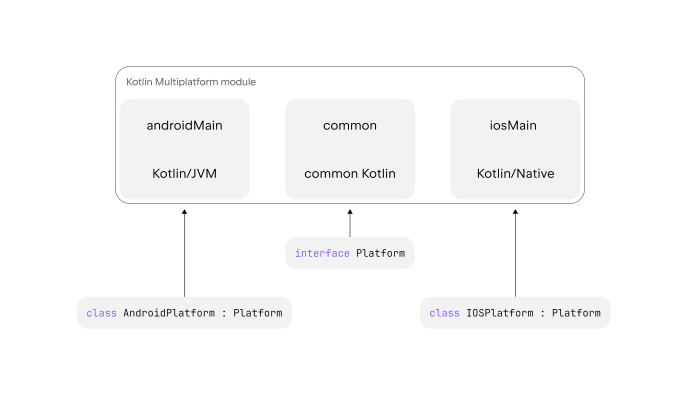
The platform name is stored as a String regardless of the platform:
Then you can assign a value to that String by overriding the declaration with a call to an Android API:
Or an iOS system call:
To inject the appropriate platform implementations when using a common interface, you can choose one of the following options:
Expected and actual functions
You can combine a common interface with expect/actual declarations.
Define an expect function that returns a value of this interface and then define actual functions that return platform-specific classes implementing the interface:
Calls to the platform() function in the common code work with objects of the Platform type. When the compiler merges the expected and actual declarations, a platform() call returns an instance of the AndroidPlatform class on Android and an instance of the IOSPlatform class on iOS.
Different entry points
If you control the entry points, you can construct implementations of each platform artifact without using expected and actual declarations. To do so, define the platform implementations in the shared Kotlin Multiplatform module but instantiate them in the platform modules:
On Android, you should create an instance of AndroidPlatform and pass it to the application() function, while on iOS, you should similarly create and pass an instance of IOSPlatform. These entry points don't need to be the entry points of your applications, but this is where you can call the specific functionality of your shared module.
Providing the right implementations with expected and actual functions or directly through entry points works well for simple scenarios. However, if you use a dependency injection framework in your project, we recommend also using it in simple cases to ensure consistency.
Dependency injection framework
A modern application can use a dependency injection (DI) framework to decide which implementation to use on the fly and create a loosely coupled architecture this way. Any DI framework that supports Kotlin Multiplatform can help you inject different dependencies into your components at runtime depending on the platform.
For example, Koin is a dependency injection framework that supports Kotlin Multiplatform. You can implement the Platform example using Koin as follows:
Here, Koin DSLs create modules that define components for injection. You declare a module in common code with the expect keyword and then provide a platform-specific implementation for each platform using the actual keyword. The framework takes care of selecting the correct implementation at runtime.
When you use a DI framework, you inject all of the dependencies through this framework. The same logic applies to handling platform dependencies. We recommend continuing to use DI if you already have it in your project, rather than using the expected and actual functions manually. This way, you can avoid mixing two different ways of injecting dependencies.
You also don't have to always implement the common interface in Kotlin. You can do it in another language, like Swift, in a different platform module. If you choose this approach, you should then provide the implementation from the iOS platform module using the DI framework:
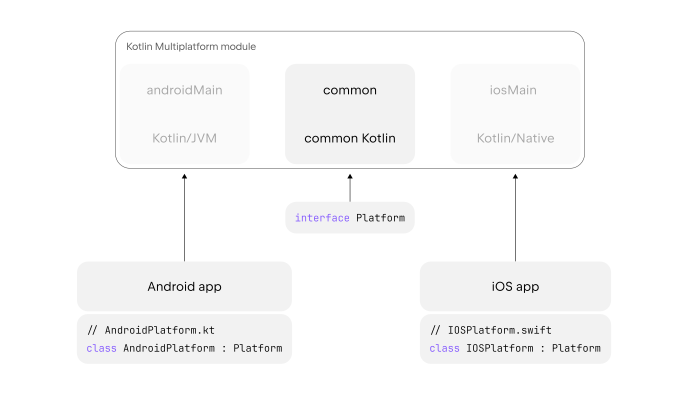
This approach only works if you put the implementations in the platform modules. It isn't very scalable, as your Kotlin Multiplatform module can't be self-sufficient, and you'll need to implement the common interface in a different module.