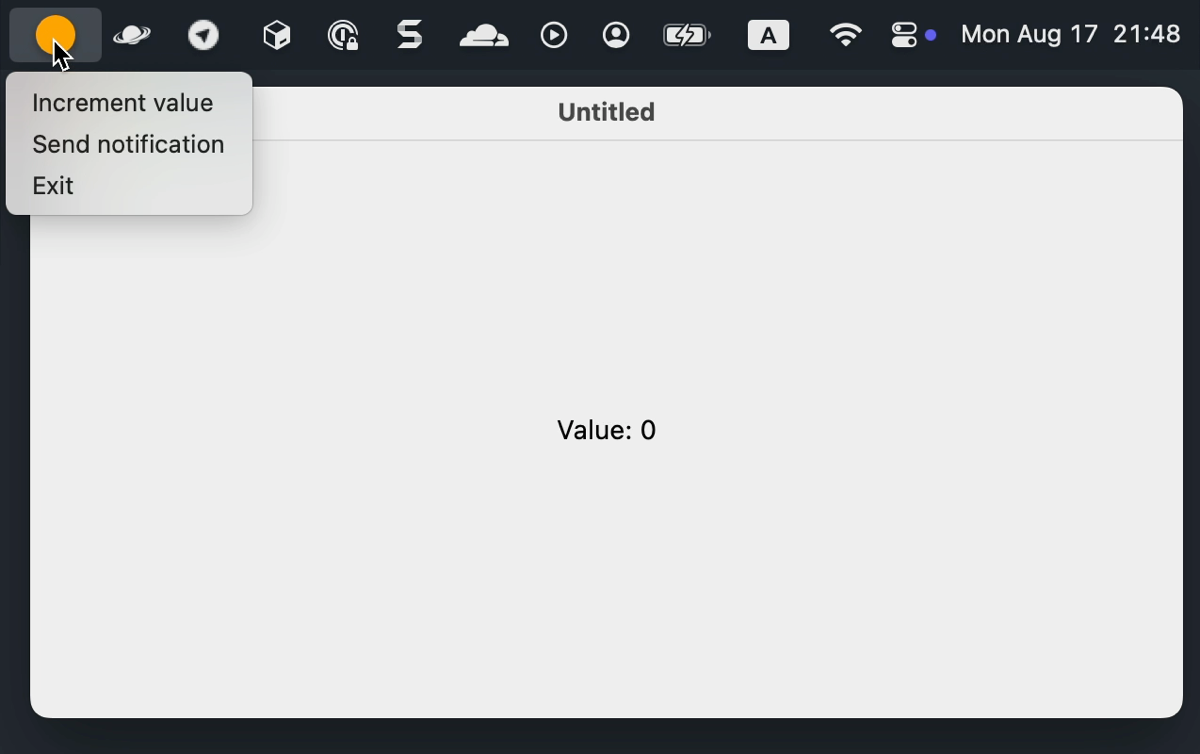
In Compose Multiplatform for desktop, you can add an application icon to the system tray and send system notifications through it.
System tray
Use the Tray() composable to add an application icon to the system tray. Tray() is available in the scope of the application() function, so it can be called next to the application windows or on its own.
The Tray() composable has the following parameters:
icon – the Painter that draws the tray icon.
menu – the contents of the tray menu. The menu opens on a right-click on Windows and on a left-click on macOS. If you don't add any items, the menu doesn't appear.
state – the TrayState used to send notifications.
tooltip – the hint shown when the user hovers over the icon.
onAction – the action triggered by clicking the icon: a double click on Windows and a right-click on macOS.
The following example creates an application icon in the tray with three menu items:
Increment value changes the state shown in the window.
Not every desktop environment has a system tray. If the platform doesn't support one, Tray() outputs an error to the standard error stream instead of throwing an exception. Check the isTraySupported property before you show tray-related options in your application.
Tray without a window
An application doesn't need a window to have a tray icon. If only the Tray() function is called, the application runs entirely in the system tray:
Because there is no window to close, exitApplication() should be called from a menu item.
Notifications
To send a system notification, create it with rememberNotification() and pass it to TrayState.sendNotification(), as the system tray example does. Notifications are delivered through the TrayState passed to a Tray() composable. If the state isn't attached to a tray, the notification is lost.
A notification consists of a title, a message, and a type, which defines the icon and the sound of the notification. The available types are None (the default option), Info, Warning, and Error.
The specific assets used for the icon and the sound depend on the platform.