How to test data structures
Lincheck provides a declarative interface for testing concurrent data structures. Instead of describing how to perform the test, you declare all the operations that need to be tested, and Lincheck generates concurrent execution scenarios, runs them, and analyzes the results.
Let's test this Counter data structure with Lincheck:
Create a test class:
class CounterTest { }Create a class property that holds an instance of your structure:
private val c = Counter()Declare the operations you want to test as member functions and annotate them with
@Operation:@Operation fun inc() = c.inc() @Operation fun dec() = c.dec()This annotation tells Lincheck which methods to include when generating execution scenarios.
Declare a test function as a member function using
ModelCheckingOptions()orStressOptions(). Annotate it with@Test:@Test fun test() = ModelCheckingOptions().check(this::class)Run the test. If it fails, Lincheck generates an error report with the scenario and execution trace that led to incorrect behavior:
= Invalid execution results = | -------------------- | | Thread 1 | Thread 2 | | -------------------- | | dec(): -1 | inc(): 1 | | -------------------- |
The testing process
When testing a data structure, Lincheck generates a list of execution scenarios, runs them, and analyzes the results.
Consider this Counter data structure:
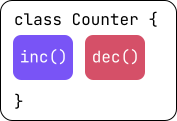
To test it, Lincheck performs the following steps:
Generates a list of random execution scenarios by randomly placing declared operations across different threads:
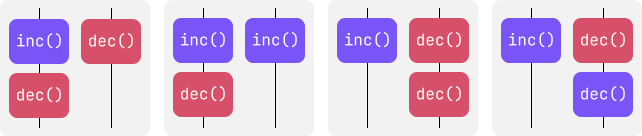
You can specify the number of threads and the number of operations per thread using the configuration options provided by Lincheck.
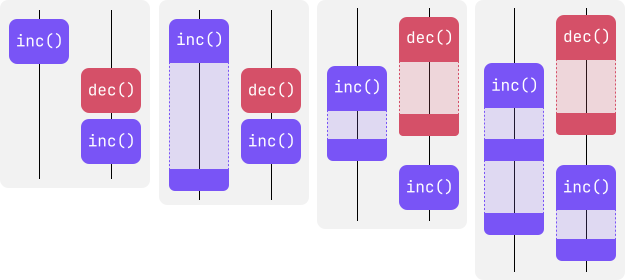
Executes the generated scenarios using the specified testing strategy: model checking or stress testing. Each of the generated scenarios is executed multiple times to examine different execution schedules:
Verifies the results of the execution against the correctness property. By default, it’s linearizability.
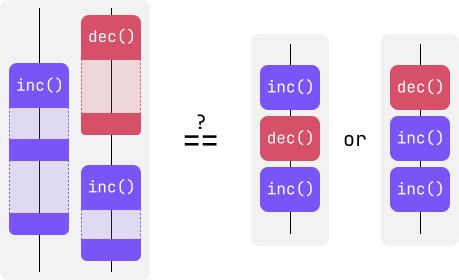
At this step, Lincheck can also validate the structure if provided with a validation function.
Example: test an implementation of a Treiber stack structure
Consider this incorrect implementation of a Treiber Stack:
You can test this structure with Lincheck to examine how the injected bug affects the behavior of the program:
Create a test structure:
class TreiberStackTest { private val stack = TreiberStack<Int>() @Operation fun push(value: Int) = stack.push(value) @Operation fun pop(): Int? = stack.pop() @Test fun modelCheckingTest() = ModelCheckingOptions() .check(this::class) }Run the test. Lincheck generates an error report and provides the execution scenario that causes incorrect behavior:
| ------------------------------ | | Thread 1 | Thread 2 | | ------------------------------ | | push(1): void | | | ------------------------------ | | pop(): 1 | push(-1): void | | ------------------------------ | | pop(): -1 | | | pop(): 1 | | | ------------------------------ |This diagram shows how the operations are placed across different threads and the return values of the operations. Lincheck also provides the specific thread interleaving that leads to incorrect results:
| ----------------------------------------------------- | | Thread 1 | Thread 2 | | ----------------------------------------------------- | | push(1) | | | ----------------------------------------------------- | | pop(): 1 | | | stack.pop(): 1 | | | top.get(): Node#1 | | | switch | | | | push(-1) | | oldHead.getNext(): null | | | top.compareAndSet(Node#1, null): false | | | oldHead.getItem(): 1 | | | result: 1 | | | ----------------------------------------------------- | | pop(): -1 | | | pop(): 1 | | | ----------------------------------------------------- |Because the implementation does not account for another thread interrupting the
pop()function,pop()returns1twice, which should not be possible.Fix the data structure. A correct implementation updates the
oldHeadvariable to the most recent value before returning the results:fun pop(): E? { var oldHead: Node<E>? var newHead: Node<E>? do { oldHead = top.get() if (oldHead == null) return null newHead = oldHead.next } while (!top.compareAndSet(oldHead, newHead)) return oldHead.item }
What’s next
Learn about testing strategies available in Lincheck.