Debugging applications that use coroutines can be challenging because multiple coroutines can run concurrently, suspend on one thread, and resume on another. Their execution order and the threads they use can also change between runs, making it difficult to follow the execution of a particular coroutine.
On the JVM, you can use the following features to make debugging coroutines easier:
Debug mode adds a unique name to each coroutine so you can identify it in a debugger and diagnostic output.
Stack trace recovery adds information about where a coroutine receives an exception instead of an expected result.
The debug agent tracks active coroutines, reports their state, and more.
Debug mode assigns a unique name to every launched coroutine. You can see the coroutine names in a Java debugger, in the coroutine's string representation, and in a thread's name while it runs the coroutine. Debug mode has negligible runtime overhead, so you can keep it enabled to simplify logging and diagnostics.
When you run your code with Java assertions enabled, the kotlinx.coroutines library automatically enables debug mode. Unit tests run with assertions enabled by default, so you don't need to enable debug mode explicitly for them.
To enable debug mode explicitly, configure your build tool, such as Gradle or Maven, or IDE run configuration to pass the -Dkotlinx.coroutines.debug argument to the JVM that runs your application.
In IntelliJ IDEA, follow these steps to enable debug mode:
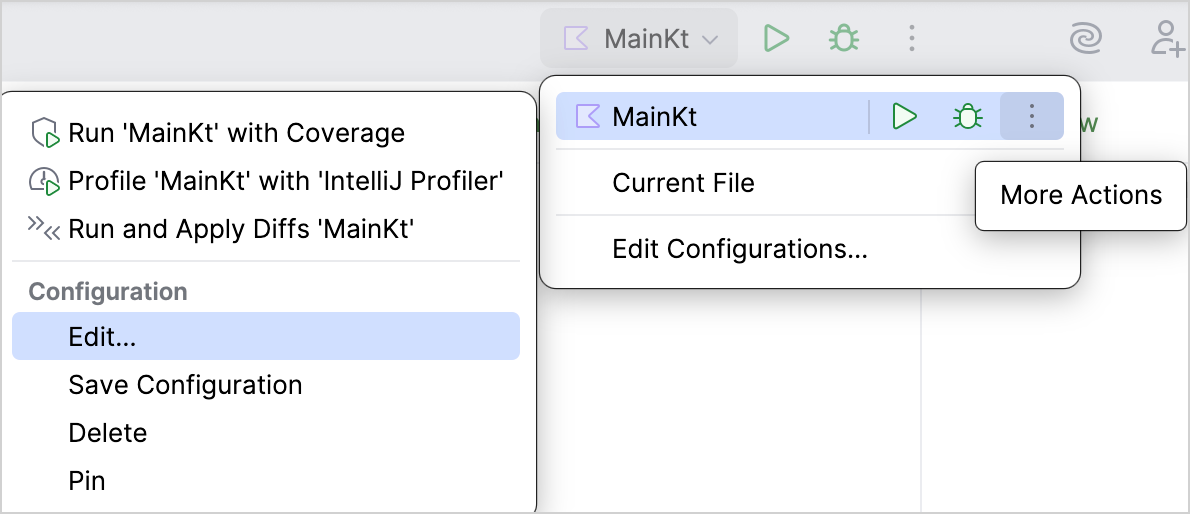
In the Run widget, select the run/debug configuration you want to update, then select More Actions | Edit:
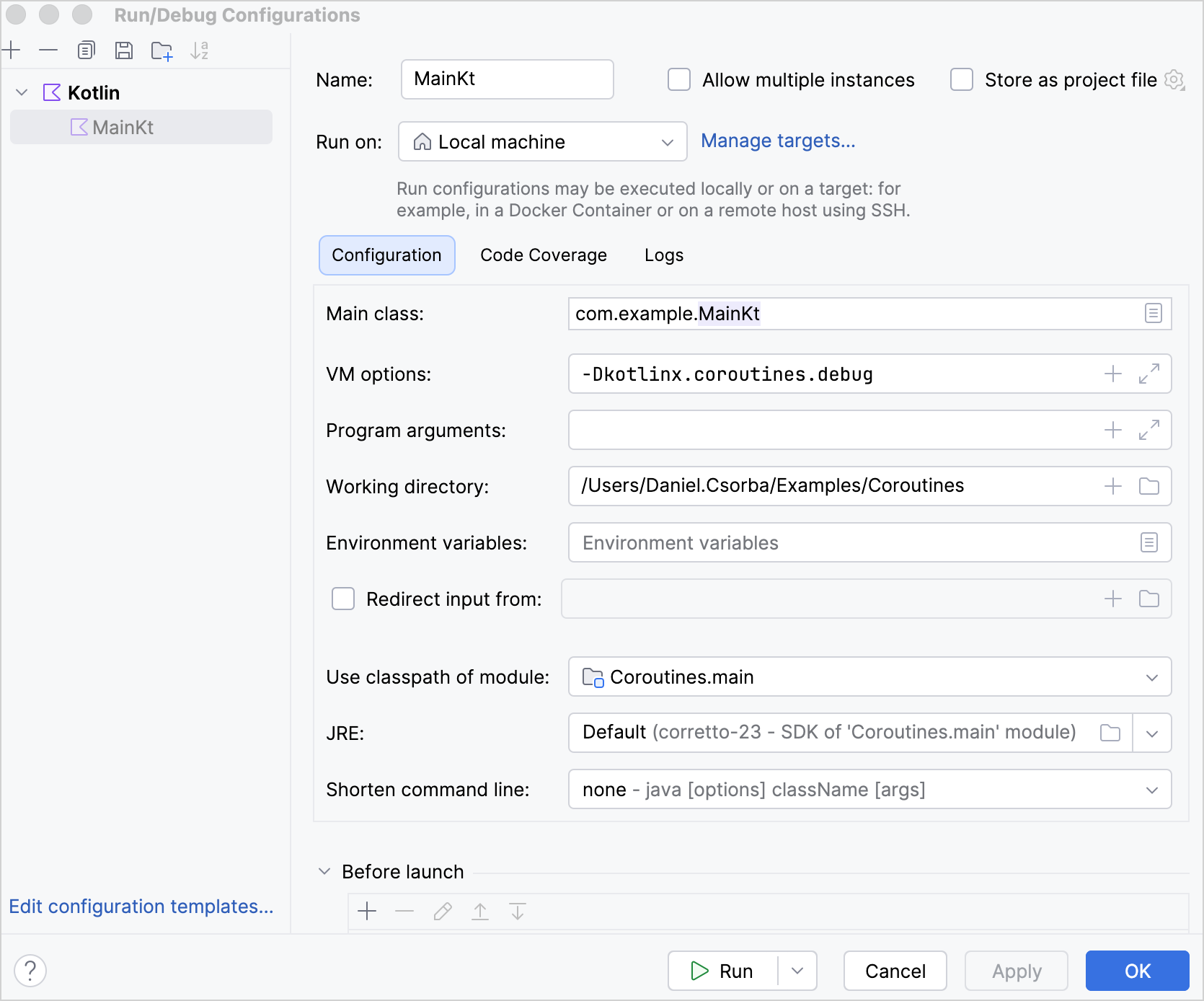
In the Run/Debug Configurations dialog, enter -Dkotlinx.coroutines.debug in the VM options field, and click OK:
Stack trace recovery
When a coroutine receives an exception from another coroutine through a suspending function such as Deferred.await(), the exception's stack trace doesn't contain the stack frames from the receiving coroutine. Without these stack frames, the stack trace doesn't show where Deferred.await() is called or which functions lead to that call, which can make debugging difficult.
The kotlinx.coroutines library adds this information using stack trace recovery, which creates a copy of the exception with additional stack frames.
When the receiving coroutine resumes, it throws the copy instead of the original exception. The original exception becomes the cause of the copy. If the original exception has suppressed exceptions, they remain attached to it instead of being copied. Keeping them attached to the original exception can prevent cycles in the exception chain and crashes in some frameworks.
Debug mode enables stack trace recovery by default. To disable stack trace recovery in debug mode, pass the -Dkotlinx.coroutines.stacktrace.recovery=false VM option.
Here's an example to demonstrate the difference between stack traces with and without stack trace recovery:
import kotlinx.coroutines.*
object UserProfileService :
CoroutineScope by CoroutineScope(CoroutineName("UserProfileService")) {
private fun parseUserProfile(): String {
error("Invalid user profile")
}
private fun loadUserProfile(): String {
return parseUserProfile()
}
// Runs in the coroutine that calls this function
suspend fun awaitUserProfile() {
// Starts a new coroutine
val userProfile = async(Dispatchers.Default) {
// The new coroutine throws the exception
loadUserProfile()
}
// The coroutine running awaitUserProfile()
// receives the exception through the await() function
userProfile.await()
}
}
suspend fun main() {
UserProfileService.awaitUserProfile()
}
In this example, the parseUserProfile() function throws the exception in the coroutine started by the .async() builder function. The coroutine that calls awaitUserProfile() receives the exception through the Deferred.await() function.
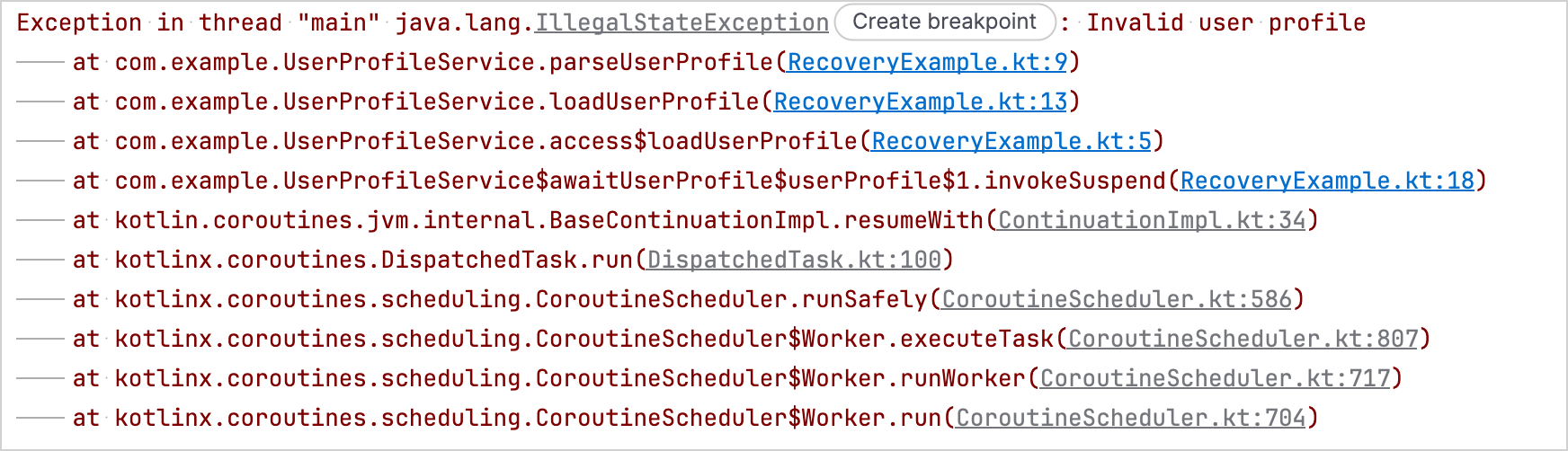
With stack trace recovery disabled, the stack trace shows where parseUserProfile() throws the exception in the coroutine created by the .async() function, but it doesn't include the Deferred.await() call in the awaitUserProfile() function:
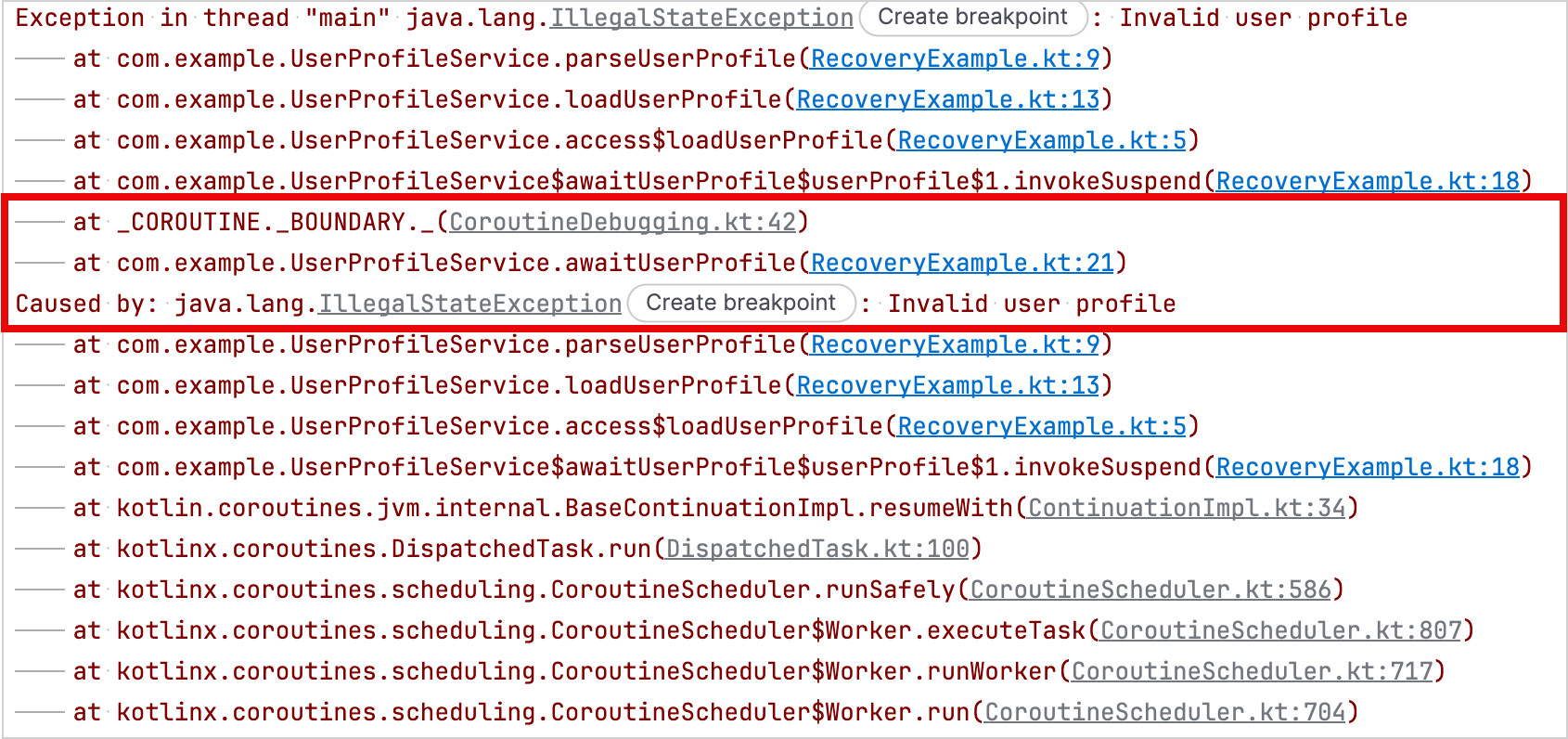
With stack trace recovery enabled, the stack trace also includes the Deferred.await() call in the awaitUserProfile() function:
Stack trace recovery for custom exceptions
Stack trace recovery can copy an exception automatically when its class has a public constructor that accepts a message, a cause, both, or no arguments at all.
If you want the kotlinx.coroutines library to recover the stack trace of an exception that requires additional constructor arguments, such as a line number or an error code, implement the StackTraceRecoverable interface.
The StackTraceRecoverable interface is part of the Kotlin standard library, so you can implement it without adding a dependency on the kotlinx.coroutines library.
To implement the interface, override the copyForStackTraceRecovery() function. In the override, return a new exception instance for stack trace recovery, or null if you don't want the kotlinx.coroutines library to copy the exception.
These APIs are Experimental and require opt-in with the @OptIn(ExperimentalStdlibCoroutineSupportApi::class) annotation.
Here's an example of a custom exception that preserves a line property when it creates a new instance for stack trace recovery:
import kotlinx.coroutines.*
import kotlin.coroutines.ExperimentalStdlibCoroutineSupportApi
import kotlin.coroutines.debug.StackTraceRecoverable
@OptIn(ExperimentalStdlibCoroutineSupportApi::class)
class FileEditException
// The implementation requires a private constructor
// to pass the cause to the IllegalStateException constructor
private constructor(
val line: Int,
private val detail: String,
cause: Throwable?,
) : IllegalStateException("When editing line $line: $detail", cause),
// Implements StackTraceRecoverable for stack trace recovery
StackTraceRecoverable<FileEditException> {
constructor(line: Int, detail: String) : this(line, detail, null)
// Copies the line number and message details
override fun copyForStackTraceRecovery(): FileEditException =
FileEditException(line, detail, this)
}
private fun editFile() {
throw FileEditException(15, "Unexpected token")
}
suspend fun main() {
supervisorScope {
// Starts a new coroutine
val fileEdit = async(Dispatchers.Default) {
// Throws the original exception
editFile()
}
// Stack trace recovery creates a copy of the exception,
// adds the calling coroutine's stack frames, and throws the copy
fileEdit.await()
}
}
With debug mode enabled, the output contains the recovered copy followed by the original exception as its cause.
Exception in thread "main" com.example.FileEditException: When editing line 15: Unexpected token
at com.example.RecoveryExampleKt.editFile(RecoveryExample.kt:54)
at com.example.RecoveryExampleKt.access$editFile(RecoveryExample.kt:1)
at com.example.RecoveryExampleKt$main$2$fileEdit$1.invokeSuspend(RecoveryExample.kt:62)
at _COROUTINE._BOUNDARY._(CoroutineDebugging.kt:42)
at com.example.RecoveryExampleKt$main$2.invokeSuspend(RecoveryExample.kt:67)
Caused by: com.example.FileEditException: When editing line 15: Unexpected token
at com.example.RecoveryExampleKt.editFile(RecoveryExample.kt:54)
at com.example.RecoveryExampleKt.access$editFile(RecoveryExample.kt:1)
at com.example.RecoveryExampleKt$main$2$fileEdit$1.invokeSuspend(RecoveryExample.kt:62)
at kotlin.coroutines.jvm.internal.BaseContinuationImpl.resumeWith(ContinuationImpl.kt:34)
at kotlinx.coroutines.DispatchedTask.run(DispatchedTask.kt:100)
at kotlinx.coroutines.scheduling.CoroutineScheduler.runSafely(CoroutineScheduler.kt:586)
at kotlinx.coroutines.scheduling.CoroutineScheduler$Worker.executeTask(CoroutineScheduler.kt:807)
at kotlinx.coroutines.scheduling.CoroutineScheduler$Worker.runWorker(CoroutineScheduler.kt:717)
at kotlinx.coroutines.scheduling.CoroutineScheduler$Worker.run(CoroutineScheduler.kt:704)
The debug agent
The kotlinx-coroutines-debug module provides a debug agent for JVM applications. The agent tracks coroutines as they are created, suspended, and resumed.
The DebugProbes API is the main entry point for the debug agent. You can use it to print active coroutines and their current state. The output includes stack traces that show where each coroutine was created and where it is suspended. You can also use it to print a coroutine dump for the hierarchy of a specific Job or CoroutineScope.
If you enable DebugProbes in a production environment, it can significantly reduce your application's performance when it creates a stack trace for each new coroutine. To avoid this overhead, set DebugProbes.enableCreationStackTraces to false.
Add the debug agent dependency
To use the debug agent in your project, add the kotlinx-coroutines-debug dependency:
Here's an example that uses the debug agent to print active coroutines and the coroutine hierarchy for a specific Job:
import kotlinx.coroutines.*
import kotlinx.coroutines.debug.*
import kotlin.time.Duration.Companion.seconds
private suspend fun loadAccount() {
delay(5.seconds)
}
private suspend fun loadPreferences() {
delay(5.seconds)
}
private suspend fun loadUserProfile() = coroutineScope {
launch { loadAccount() }
launch { loadPreferences() }
}
@OptIn(ExperimentalCoroutinesApi::class)
fun main() {
// Installs the debug agent
// This is only required if you don't use the -javaagent VM option
DebugProbes.install()
runBlocking {
// Starts a coroutine with two child coroutines
val loadingJob = launch {
loadUserProfile()
}
// Gives the child coroutines time to suspend
delay(1.seconds)
// Prints all active coroutines
DebugProbes.dumpCoroutines()
println("============")
// Prints the loading job and its child coroutines
DebugProbes.printJob(loadingJob)
}
}
With debug mode enabled, running the example produces the following output:
Coroutines dump 2026/08/18 14:00:08
Coroutine "coroutine#1":BlockingCoroutine{Active}@146ba0ac, state: RUNNING
at java.base/java.lang.Thread.getStackTrace(Thread.java:2389)
at kotlinx.coroutines.debug.internal.DebugProbesImpl.enhanceStackTraceWithThreadDumpImpl(DebugProbesImpl.kt:339)
at kotlinx.coroutines.debug.internal.DebugProbesImpl.dumpCoroutinesSynchronized(DebugProbesImpl.kt:294)
at kotlinx.coroutines.debug.internal.DebugProbesImpl.dumpCoroutines(DebugProbesImpl.kt:266)
at kotlinx.coroutines.debug.DebugProbes.dumpCoroutines(DebugProbes.kt:181)
at kotlinx.coroutines.debug.DebugProbes.dumpCoroutines$default(DebugProbes.kt:181)
at DebugAgentExampleKt$main$1.invokeSuspend(DebugAgentExample.kt:34)
Coroutine "coroutine#2":StandaloneCoroutine{Active}@4dfa3a9d, state: SUSPENDED
at DebugAgentExampleKt$main$1$loadingJob$1.invokeSuspend(DebugAgentExample.kt:27)
Coroutine "coroutine#3":StandaloneCoroutine{Active}@6eebc39e, state: SUSPENDED
at DebugAgentExampleKt$loadUserProfile$2$1.invokeSuspend(DebugAgentExample.kt:14)
Coroutine "coroutine#4":StandaloneCoroutine{Active}@464bee09, state: SUSPENDED
at DebugAgentExampleKt$loadUserProfile$2$2.invokeSuspend(DebugAgentExample.kt:15)============
"coroutine#2":StandaloneCoroutine{Active}, continuation is SUSPENDED at line DebugAgentExampleKt$main$1$loadingJob$1.invokeSuspend(DebugAgentExample.kt:27)
"coroutine#3":StandaloneCoroutine{Active}, continuation is SUSPENDED at line DebugAgentExampleKt$loadUserProfile$2$1.invokeSuspend(DebugAgentExample.kt:14)
"coroutine#4":StandaloneCoroutine{Active}, continuation is SUSPENDED at line DebugAgentExampleKt$loadUserProfile$2$2.invokeSuspend(DebugAgentExample.kt:15)
Print active coroutines when JUnit tests time out
You can set a timeout for JUnit tests with the corresponding CoroutinesTimeout API, depending on the JUnit version. The API installs debug probes automatically. If a test doesn't complete before the timeout, it prints all active coroutines and their stack traces and fails the test.
JUnit 4
To set a timeout for JUnit 4 tests and print all active coroutines and their stack traces if they exceed it, use the CoroutinesTimeout rule:
import kotlinx.coroutines.*
import kotlinx.coroutines.debug.junit4.CoroutinesTimeout
import org.junit.Rule
import org.junit.Test
import kotlin.time.Duration
@OptIn(ExperimentalCoroutinesApi::class)
class UserProfileTest {
@get:Rule
val timeout = CoroutinesTimeout.seconds(1)
private suspend fun loadUserProfile() {
withContext(Dispatchers.IO) {
// Simulates an operation that doesn't complete
delay(Duration.INFINITE)
}
}
@Test
fun loadsUserProfile() = runBlocking {
val loadingJob = launch {
loadUserProfile()
}
// Waits for the coroutine, so the test doesn't complete
loadingJob.join()
}
}
After one second, the rule reports that the test timed out and prints all active coroutines and their stack traces. The test then fails with a TestTimedOutException.
Test loadsUserProfile timed out after 1 seconds
Coroutines dump 2026/08/18 13:48:21
Coroutine "coroutine#1":BlockingCoroutine{Active}@bf1ec20, state: SUSPENDED
at UserProfileTest$loadsUserProfile$1.invokeSuspend(UserProfileTest.kt:27)
at _COROUTINE._CREATION._(CoroutineDebugging.kt:30)
at kotlin.coroutines.intrinsics.IntrinsicsKt__IntrinsicsJvmKt.createCoroutineUnintercepted(IntrinsicsJvm.kt:161)
at kotlinx.coroutines.intrinsics.CancellableKt.startCoroutineCancellable(Cancellable.kt:26)
at kotlinx.coroutines.BuildersKt__Builders_concurrentKt.runBlockingK$default(Builders.concurrent.kt:157)
at kotlinx.coroutines.BuildersKt.runBlockingK$default(Unknown Source)
at UserProfileTest.loadsUserProfile(UserProfileTest.kt:21)
at java.base/jdk.internal.reflect.DirectMethodHandleAccessor.invoke(DirectMethodHandleAccessor.java:103)
at java.base/java.lang.reflect.Method.invoke(Method.java:580)
at org.junit.runners.model.FrameworkMethod$1.runReflectiveCall(FrameworkMethod.java:59)
at org.junit.internal.runners.model.ReflectiveCallable.run(ReflectiveCallable.java:12)
at org.junit.runners.model.FrameworkMethod.invokeExplosively(FrameworkMethod.java:56)
at org.junit.internal.runners.statements.InvokeMethod.evaluate(InvokeMethod.java:17)
at kotlinx.coroutines.debug.junit4.CoroutinesTimeoutStatement$evaluate$$inlined$runWithTimeoutDumpingCoroutines$1.call(CoroutinesTimeoutImpl.kt:79)
at kotlinx.coroutines.debug.junit4.CoroutinesTimeoutStatement$evaluate$$inlined$runWithTimeoutDumpingCoroutines$1.call(CoroutinesTimeoutImpl.kt:79)
at java.base/java.util.concurrent.FutureTask.run(FutureTask.java:317)
at java.base/java.lang.Thread.run(Thread.java:1575)
Coroutine "coroutine#2":StandaloneCoroutine{Active}@70efb718, state: SUSPENDED
at UserProfileTest$loadUserProfile$2.invokeSuspend(UserProfileTest.kt:16)
at UserProfileTest$loadsUserProfile$1$loadingJob$1.invokeSuspend(UserProfileTest.kt:23)
at _COROUTINE._CREATION._(CoroutineDebugging.kt:30)
at kotlin.coroutines.intrinsics.IntrinsicsKt__IntrinsicsJvmKt.createCoroutineUnintercepted(IntrinsicsJvm.kt:161)
at kotlinx.coroutines.intrinsics.CancellableKt.startCoroutineCancellable(Cancellable.kt:26)
at kotlinx.coroutines.BuildersKt__Builders_commonKt.launch$default(Builders.common.kt:200)
at kotlinx.coroutines.BuildersKt.launch$default(Unknown Source)
at UserProfileTest$loadsUserProfile$1.invokeSuspend(UserProfileTest.kt:22)
at kotlin.coroutines.jvm.internal.BaseContinuationImpl.resumeWith(ContinuationImpl.kt:34)
at kotlinx.coroutines.DispatchedTask.run(DispatchedTask.kt:100)
at kotlinx.coroutines.BuildersKt__Builders_concurrentKt.runBlockingK$default(Builders.concurrent.kt:157)
at kotlinx.coroutines.BuildersKt.runBlockingK$default(Unknown Source)
at UserProfileTest.loadsUserProfile(UserProfileTest.kt:21)
at java.base/jdk.internal.reflect.DirectMethodHandleAccessor.invoke(DirectMethodHandleAccessor.java:103)
at java.base/java.lang.reflect.Method.invoke(Method.java:580)
at org.junit.runners.model.FrameworkMethod$1.runReflectiveCall(FrameworkMethod.java:59)
at org.junit.internal.runners.model.ReflectiveCallable.run(ReflectiveCallable.java:12)
at org.junit.runners.model.FrameworkMethod.invokeExplosively(FrameworkMethod.java:56)
at org.junit.internal.runners.statements.InvokeMethod.evaluate(InvokeMethod.java:17)
at kotlinx.coroutines.debug.junit4.CoroutinesTimeoutStatement$evaluate$$inlined$runWithTimeoutDumpingCoroutines$1.call(CoroutinesTimeoutImpl.kt:79)
at kotlinx.coroutines.debug.junit4.CoroutinesTimeoutStatement$evaluate$$inlined$runWithTimeoutDumpingCoroutines$1.call(CoroutinesTimeoutImpl.kt:79)
at java.base/java.util.concurrent.FutureTask.run(FutureTask.java:317)
at java.base/java.lang.Thread.run(Thread.java:1575)
test timed out after 1000 milliseconds
org.junit.runners.model.TestTimedOutException: test timed out after 1000 milliseconds
at java.base/jdk.internal.misc.Unsafe.park(Native Method)
at java.base/java.util.concurrent.locks.LockSupport.parkNanos(LockSupport.java:269)
at kotlinx.coroutines.BlockingCoroutine.joinBlocking(Builders.kt:57)
at kotlinx.coroutines.BuildersKt__BuildersKt.runBlockingImpl(Builders.kt:30)
at kotlinx.coroutines.BuildersKt.runBlockingImpl(Unknown Source)
at kotlinx.coroutines.BuildersKt__Builders_concurrentKt.runBlockingK(Builders.concurrent.kt:172)
at kotlinx.coroutines.BuildersKt.runBlockingK(Unknown Source)
at kotlinx.coroutines.BuildersKt__Builders_concurrentKt.runBlockingK$default(Builders.concurrent.kt:157)
at kotlinx.coroutines.BuildersKt.runBlockingK$default(Unknown Source)
at UserProfileTest.loadsUserProfile(UserProfileTest.kt:21)
at java.base/jdk.internal.reflect.DirectMethodHandleAccessor.invoke(DirectMethodHandleAccessor.java:103)
at java.base/java.lang.reflect.Method.invoke(Method.java:580)
at org.junit.runners.model.FrameworkMethod$1.runReflectiveCall(FrameworkMethod.java:59)
at org.junit.internal.runners.model.ReflectiveCallable.run(ReflectiveCallable.java:12)
at org.junit.runners.model.FrameworkMethod.invokeExplosively(FrameworkMethod.java:56)
at org.junit.internal.runners.statements.InvokeMethod.evaluate(InvokeMethod.java:17)
at kotlinx.coroutines.debug.junit4.CoroutinesTimeoutStatement$evaluate$$inlined$runWithTimeoutDumpingCoroutines$1.call(CoroutinesTimeoutImpl.kt:79)
at java.base/java.util.concurrent.FutureTask.run(FutureTask.java:317)
at java.base/java.lang.Thread.run(Thread.java:1575)
JUnit 5
To apply a timeout to all test functions in a class, add the @CoroutinesTimeout annotation to the class:
import kotlinx.coroutines.*
import kotlinx.coroutines.debug.junit5.CoroutinesTimeout
import org.junit.jupiter.api.Test
import kotlin.time.Duration
@OptIn(ExperimentalCoroutinesApi::class)
// Sets a one-second timeout for all test functions in the class
@CoroutinesTimeout(testTimeoutMs = 1_000)
class UserProfileTest {
private suspend fun loadUserProfile() {
withContext(Dispatchers.IO) {
// Simulates an operation that doesn't complete
delay(Duration.INFINITE)
}
}
@Test
fun loadsUserProfile() = runBlocking {
val loadingJob = launch {
loadUserProfile()
}
// Waits for the coroutine, so the test doesn't complete
loadingJob.join()
}
}
After one second, the CoroutinesTimeout API reports the timeout and prints all active coroutines and their stack traces. The test then fails with a CoroutinesTimeoutException.
Test loadsUserProfile timed out after 1 seconds
Coroutines dump 2026/08/18 13:46:15
Coroutine "coroutine#1":BlockingCoroutine{Active}@5c77053b, state: SUSPENDED
at UserProfileTest$loadsUserProfile$1.invokeSuspend(UserProfileTest.kt:24)
Coroutine "coroutine#2":StandaloneCoroutine{Active}@26b894bd, state: SUSPENDED
at UserProfileTest$loadUserProfile$2.invokeSuspend(UserProfileTest.kt:13)
at UserProfileTest$loadsUserProfile$1$loadingJob$1.invokeSuspend(UserProfileTest.kt:20)
test timed out after 1000 ms
kotlinx.coroutines.debug.junit5.CoroutinesTimeoutException: test timed out after 1000 ms
at java.base/jdk.internal.misc.Unsafe.park(Native Method)
at java.base/java.util.concurrent.locks.LockSupport.parkNanos(LockSupport.java:269)
at kotlinx.coroutines.BlockingCoroutine.joinBlocking(Builders.kt:57)
at kotlinx.coroutines.BuildersKt__BuildersKt.runBlockingImpl(Builders.kt:30)
at kotlinx.coroutines.BuildersKt.runBlockingImpl(Unknown Source)
at kotlinx.coroutines.BuildersKt__Builders_concurrentKt.runBlockingK(Builders.concurrent.kt:172)
at kotlinx.coroutines.BuildersKt.runBlockingK(Unknown Source)
at kotlinx.coroutines.BuildersKt__Builders_concurrentKt.runBlockingK$default(Builders.concurrent.kt:157)
at kotlinx.coroutines.BuildersKt.runBlockingK$default(Unknown Source)
at UserProfileTest.loadsUserProfile(UserProfileTest.kt:18)
at java.base/java.lang.reflect.Method.invoke(Method.java:580)
at kotlinx.coroutines.debug.junit5.CoroutinesTimeoutExtension$interceptInvocation$$inlined$runWithTimeoutDumpingCoroutines$1.call(CoroutinesTimeoutImpl.kt:79)
at java.base/java.util.concurrent.FutureTask.run(FutureTask.java:317)
at java.base/java.lang.Thread.run(Thread.java:1575)
Resolve kotlinx-coroutines-debug resource conflicts on Android
The debug agent isn't supported on Android.
The kotlinx-coroutines-debug module has transitive dependencies on JNA, JNA Platform, Byte Buddy, and Byte Buddy Agent. Some of these dependencies contain resources with the same paths. When Android merges dependency resources, the duplicate paths can cause a DuplicateRelativeFileException resulting in a build failure.
To resolve the build failure while keeping the kotlinx-coroutines-debug dependency, exclude the conflicting resources with the following packaging configuration in your build.gradle.kts file:
// build.gradle.kts
android {
packaging {
resources {
// Excludes license files from JNA and JNA Platform
excludes += setOf(
"META-INF/AL2.0",
"META-INF/LGPL2.1",
)
// Excludes the ASM license file from Byte Buddy
excludes += "META-INF/licenses/ASM"
// Retains one copy of each Byte Buddy Agent file
pickFirsts += setOf(
"win32-x86-64/attach_hotspot_windows.dll",
"win32-x86/attach_hotspot_windows.dll",
)
}
}
}