Lifecycle
Lifecycle of components in Compose Multiplatform is adopted from the Jetpack Compose lifecycle concept. Lifecycle-aware components can react to changes in the lifecycle state of other components and help you produce better-organized, and often lighter, code that is easier to maintain.
Compose Multiplatform provides a common LifecycleOwner implementation, which extends the original Jetpack Compose functionality to other platforms and helps observe lifecycle states in common code.
To use the multiplatform Lifecycle implementation, add the following dependency to your commonMain source set:
States and events
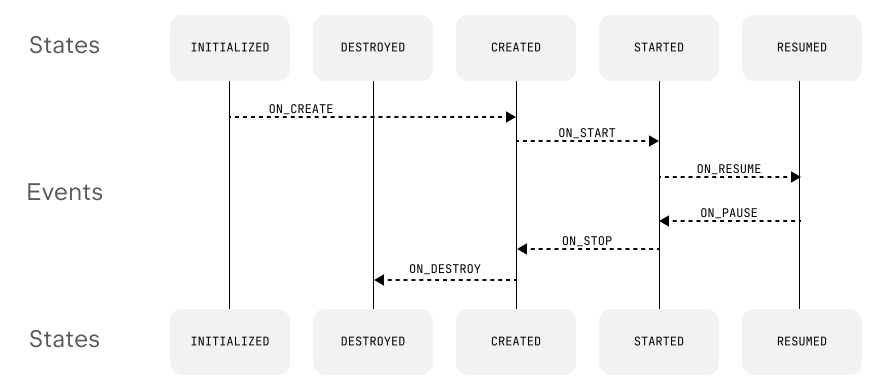
The flow of lifecycle states and events (same as for the Jetpack lifecycle):
Lifecycle implementation
Composables usually don't need unique lifecycles: a common LifecycleOwner provides a lifecycle for all interconnected entities. By default, all composables created by Compose Multiplatform share the same lifecycle – they can subscribe to its events, refer to the lifecycle state, and so on.
When working with coroutines in multiplatform lifecycles, remember that the Lifecycle.coroutineScope value is tied to the Dispatchers.Main.immediate value, which might be unavailable on desktop targets by default. To make coroutines and flows in lifecycles work correctly with Compose Multiplatform, add the kotlinx-coroutines-swing dependency to your project. See Dispatchers.Main documentation for details.
Learn how the lifecycle works in navigation components in Navigation and routing.
Learn more about the multiplatform ViewModel implementation on the Multiplatform ViewModel page.
Mapping Android lifecycle to other platforms
iOS
Native events and notifications | Lifecycle event | Lifecycle state change |
|---|---|---|
|
|
|
|
|
|
|
|
|
|
|
|
|
|
|
|
|
|
|
|
|
Web
Due to limitations of the Wasm target, lifecycles:
Skip the
CREATEDstate, as the application is always attached to the page.Never reach the
DESTROYEDstate, as web pages are usually terminated only when the user closes the tab.
Native event | Lifecycle event | Lifecycle state change |
|---|---|---|
|
|
|
|
|
|
|
|
|
|
|
|
Desktop
Swing listener callbacks | Lifecycle event | Lifecycle state change |
|---|---|---|
|
|
|
|
|
|
|
|
|
|
|
|
|
|
|